
Why Is Shadow IT a Data Leakage Problem?
Most teams do not find shadow IT through a planned audit. They find it after company data appears in a tool, account, or folder that security never approved.
That might be a customer file in someone’s personal cloud storage, an employee spreadsheet shared through an unapproved app, or meeting notes pasted into an AI tool that stores prompt history outside company control.
Shadow IT usually starts as a work shortcut, not a security decision.
| What the person needs to do | What they may use instead |
| Share a large file | Personal Dropbox or Google Drive |
| Clean up meeting notes | Public AI chat account |
| Message a vendor | WhatsApp or Telegram |
| Analyze customer data | Free browser extension or add-on |
From the employee’s side, the task is finished. From the security team’s side, a new blind spot now exists because company data has moved outside the approved stack.
That blind spot is getting larger. Gartner says that by 2027, 75% of employees will acquire, modify, or create technology outside IT’s visibility, up from 41% in 2022. That matters because every unapproved tool can become another place where company data lives.
The risk is not only the app or website itself but the data trail.
Approved system → export → chat message → personal folder → AI prompt
Each step creates another copy, and each copy raises the same questions: who can access it, where is it stored, can it be removed, and would anyone know if it leaked?
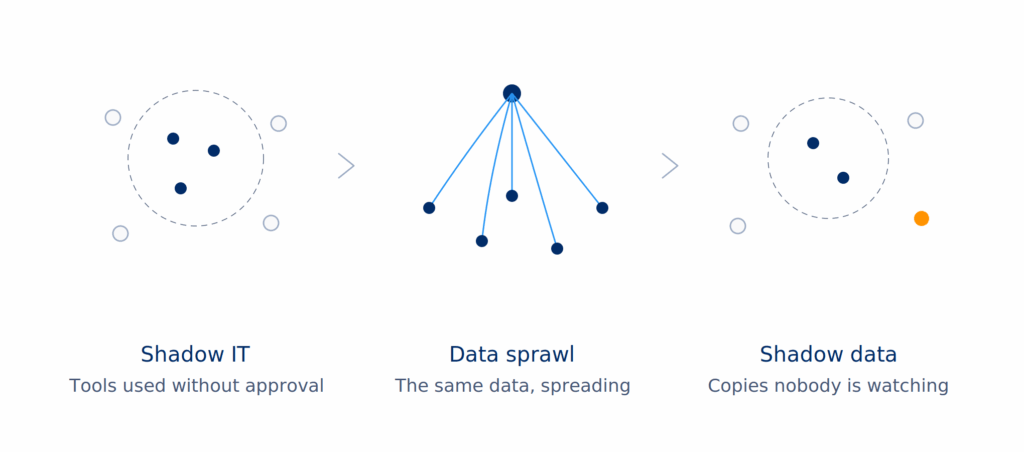
Shadow IT, data sprawl, and shadow data: what each one means
These three terms get mixed up all the time.
They are connected, but they do not mean the same thing.
| Term | Plain-English meaning | Example |
| Shadow IT | Tools your team uses without IT approval or oversight. | A sales team uploads customer data into an unapproved AI note-taking tool. |
| Data sprawl | Sensitive data spreads across too many apps, folders, accounts, and devices. | The same customer list lives in Salesforce, Google Sheets, Slack, a laptop, and a personal Dropbox account. |
| Shadow data | Data your company does not know exists, does not govern, or no longer tracks. | An old export of employee records sits in a forgotten cloud folder with public sharing turned on. |
Shadow IT creates data sprawl. Data sprawl creates shadow data. Shadow data creates leakage risk.
Let’s review each of them.
Shadow IT: the tools
Shadow IT is any technology used at work without approval, tracking, or control from IT or security.
That could mean:
- A personal file-sharing account
- An unapproved browser extension
- A project management app bought on a team credit card
- A messaging app used for vendor conversations
- A free AI tool used to summarize internal documents
- A personal email account used to move work files
Not every shadow IT tool starts as a security problem. Often, it’s just employees trying to do what they were asked.
Sometimes the approved tool is too slow. Sometimes procurement takes too long. Sometimes a team needs to hit a deadline and picks the tool that gets the work done.
But once company data enters that tool, the risk changes.
Now your team has to answer harder questions:
| Question | Why it matters |
| Who owns the account? | A personal account may stay active after the employee leaves. |
| Where is the data stored? | The tool may store data in locations your team does not track. |
| Who can access it? | Sharing links, guests, and connected apps may expose more than expected. |
| Can it be deleted? | Some tools keep logs, prompts, copies, or backups. |
| Will anyone know if it leaks? | Unmonitored tools rarely trigger your normal alerts. |
That is why shadow IT is more than an app inventory issue, it is a visibility issue.
Data sprawl: the spread
Data sprawl happens when information spreads across too many systems.
Some of those systems are approved. Some are not.
For example, a customer file may start in a CRM. Then someone exports it to a spreadsheet. Then the spreadsheet gets shared in a chat. Then a team member uploads it to an AI tool to summarize account notes. Then a copy sits in a personal downloads folder.
Same data. More locations. Less control.
Shadow data: the hidden copies
Shadow data is the data your company does not know about, does not manage, or has lost track of.
It may be:
- Forgotten
- Duplicated
- Misclassified
- Stored in the wrong place
- Exposed through a sharing setting
- Sitting in an old account nobody owns
- Created by an app your team never approved
Shadow data is where leakage risk grows.
Not because every copy gets stolen, but because nobody is monitoring it.
How Does Shadow IT Turn Into a Data Leak?
Shadow IT turns into a data leak when company information moves into a tool that security cannot track, govern, or remove with confidence.
The leak does not need to start with an attacker. It can start with a normal work action that creates an unmanaged copy.
| Step | What happens | Why it creates risk |
| 1. A team picks an unapproved tool | Someone signs up for a file-sharing app, AI tool, plug-in, or messaging app. | The tool sits outside normal approval, logging, and access rules. |
| 2. Company data gets copied in | A file, customer record, code snippet, contract, or meeting note gets uploaded or pasted. | Sensitive data now exists outside the approved system. |
| 3. Access spreads | Links get shared, guests get added, or the tool connects to another app. | More people and systems can touch the data than intended. |
| 4. Ownership gets unclear | The account belongs to an employee, team, vendor, or personal email. | Security may not know who controls the data or how to remove it. |
| 5. Exposure becomes visible too late | The data appears in a breach dump, public folder, AI history, or third-party incident. | The company learns about the exposure after control has already been lost. |
A spreadsheet exported from the CRM for analysis is not a breach by itself. The risk grows when that spreadsheet moves into chat, then a personal folder, then an AI tool, with no clear owner or retention rule.
That is the critical shift: shadow IT creates the unapproved place, but the copied data creates the leak path.
LayerX’s 2025 Enterprise AI and SaaS Data Security Report found that generative AI use often happens through unmanaged accounts, where sensitive data can move through browser activity and copy-paste actions that older controls were not built to monitor.
What Are Common Examples of Shadow IT Data Leakage?
Shadow IT data leakage usually starts with ordinary work: moving files, testing a tool, connecting an app, or pasting content into an AI window. The risk grows when sensitive data enters a tool the company does not manage.
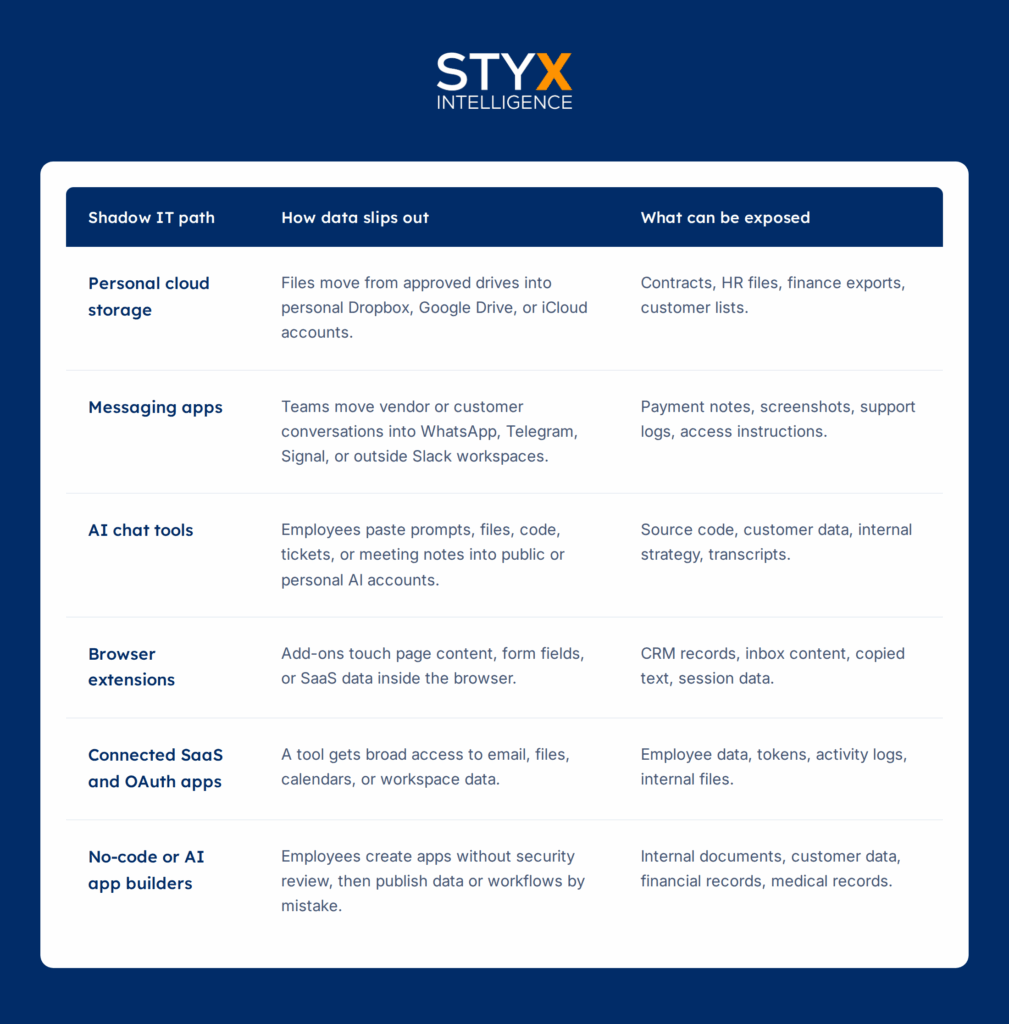
| Shadow IT path | How data slips out | What can be exposed |
| Personal cloud storage | Files move from approved drives into personal Dropbox, Google Drive, or iCloud accounts. | Contracts, HR files, finance exports, customer lists. |
| Messaging apps | Teams move vendor or customer conversations into WhatsApp, Telegram, Signal, or outside Slack workspaces. | Payment notes, screenshots, support logs, access instructions. |
| AI chat tools | Employees paste prompts, files, code, tickets, or meeting notes into public or personal AI accounts. | Source code, customer data, internal strategy, transcripts. |
| Browser extensions | Add-ons touch page content, form fields, or SaaS data inside the browser. | CRM records, inbox content, copied text, session data. |
| Connected SaaS and OAuth apps | A tool gets broad access to email, files, calendars, or workspace data. | Employee data, tokens, activity logs, internal files. |
| No-code or AI app builders | Employees create apps without security review, then publish data or workflows by mistake. | Internal documents, customer data, financial records, medical records. |
Public incidents show the same pattern: sensitive data moves into an external tool or connected workflow, then the company loses clear control over access.
| Real-life example | What happened | Why it matters |
| Samsung | In an older but still relevant 2023 case, Samsung employees reportedly pasted source code and internal meeting notes into ChatGPT, according to The Register and Forbes. | AI prompts can become a leakage path when employees paste sensitive work into unmanaged tools. |
| McDonald’s and Paradox.ai | In 2025, researchers found flaws in McDonald’s AI hiring chatbot system, exposing applicant data handled through Paradox.ai’s platform, according to Wired. | Third-party AI systems can hold sensitive data, and weak access controls can turn that data into exposure. |
| Vercel | In 2026, Vercel said an incident began with a third-party AI tool whose Google Workspace OAuth app had been compromised, according to Vercel’s own security bulletin. | Connected apps can create access paths that sit outside normal app inventory reviews. |
| AI app-building tools | In 2026, Axios reported that AI app-building tools had exposed public assets, including sensitive corporate information, based on research from RedAccess. | Employees can now build and publish tools without going through normal development or security checks. |
The point is not that every outside tool creates a leak. The issue is that once sensitive data moves into unmanaged tools, third-party AI systems, or connected apps, security teams have less control over who can access it, how long it stays there, and whether it can be removed.
Why Is Shadow AI the New Face of Shadow IT?
Shadow AI is the use of AI tools without security approval or oversight. It includes personal AI chat accounts, meeting assistants, browser copilots, code assistants, and AI app builders used for work.
The risk is different from older shadow IT because data can leave through a prompt box, not a file upload. That makes the control gap wider. LayerX’s 2025 Enterprise AI and SaaS Data Security Report found that 77% of employees using generative AI paste data into prompts, and 82% of that activity happens through unmanaged accounts. In plain English, company data may leave through an AI account security does not manage.
The business cost is also showing up in breach data. IBM’s 2025 Cost of a Data Breach findings found that one in five organizations reported a breach tied to shadow AI, and companies with high shadow AI use saw USD 670,000 in higher breach costs than those with little or no shadow AI.
| Shadow AI use | Data that can leave |
| Meeting summary | Customer calls, employee discussions, deal details |
| Code help | Source code, API details, architecture notes |
| Spreadsheet cleanup | Customer records, payment data, HR information |
| AI app builder | Internal workflows, files, business logic |
What to watch for
- Employees using personal AI accounts for work tasks.
- AI tools connected to email, calendars, drives, or code repositories.
- Prompts that include customer records, employee data, source code, or contracts.
- Browser extensions that add AI features inside approved SaaS tools.
- AI-generated apps published without security review.
Why Do Blocking Apps and Old Data-Loss Tools Fall Short?
Blocking one app can reduce one path, but it does not solve shadow IT data leakage. Employees can still use personal accounts, browser extensions, connected apps, or a different tool that does the same job.
That is why “just block it” often moves the problem instead of removing it.
| Old control | Where it helps | Where it falls short |
| App blocking | Stops access to known dangerous domains or tools. | Misses personal devices, personal accounts, copycat tools, and approved apps used in unsafe ways. |
| Traditional DLP | Helps catch file uploads, email attachments, and known sensitive patterns. | Often misses browser-based copy and paste into AI tools or unmanaged SaaS accounts. |
| SaaS allowlists | Limits which tools teams can use officially. | Does not show what data already moved before the rule existed. |
| Security awareness training | Helps employees understand what not to share. | Does not give security teams visibility into where data has already spread. |
The AI shift makes this harder. Tom’s Guide, reporting on Cyera’s 2025 findings, described how company data can leave through AI chat windows because copy and paste does not look like a classic file upload or outbound email.
The better control starts with visibility. Security teams need to know which tools are in use, what data has moved, which accounts control it, and whether any exposed data has already surfaced outside approved systems.
How Can You See Shadow IT Exposure From the Outside In?
Blocking tools helps only when security already knows what to block. However, as you already know, shadow IT creates a different problem: data can move into accounts, apps, and workflows that never entered the approved inventory.
That is why the better question is not only, “Which apps are employees using?”
It is also:
“What company data is already exposed outside approved systems?”
An outside-in approach looks for signs of exposure where leaked or misused data tends to appear: public websites, exposed cloud storage, code repositories, criminal forums, breach collections, marketplaces, and dark web sources.
| What to look for | Why it matters |
| Leaked credentials | A reused password or exposed login can give attackers access to approved systems. |
| Exposed files or code | Documents, source code, and technical details can surface outside managed storage. |
| Unapproved cloud assets | Shadow apps, storage buckets, and public folders can hold sensitive data. |
| Third-party exposure | Vendor breaches can expose your data even when your own systems were not breached. |
| Brand or domain misuse | Fake portals and lookalike domains can collect employee or customer data. |
This is where external visibility matters. Styx’s platform is built to help teams identify, prioritize, monitor, and remediate external digital threats, including leaked data, phishing domains, exposed assets, third-party vulnerabilities, and risks outside the firewall.
The goal is not to chase every possible issue. The goal is to rank exposure by business risk so teams can act on what matters first.
Styx’s positioning centers on bringing visibility, prioritization, and remediation into one platform for threats to a company’s brand, people, and external digital infrastructure.
A practical workflow looks like this:
- Find what is exposed: Search for credentials, files, code, domains, cloud assets, and third-party signals outside approved systems.
- Confirm what belongs to the company: Separate noise from assets, data, or accounts tied to the business.
- Score by risk: Prioritize exposure that involves sensitive data, access paths, active abuse, or customer impact.
- Act on the few items that matter most: Remove exposed data, reset credentials, close public access, contact vendors, or start takedown workflows.
- Feed the findings back into internal controls: Use what surfaced outside to improve app approval, employee guidance, and data handling rules.
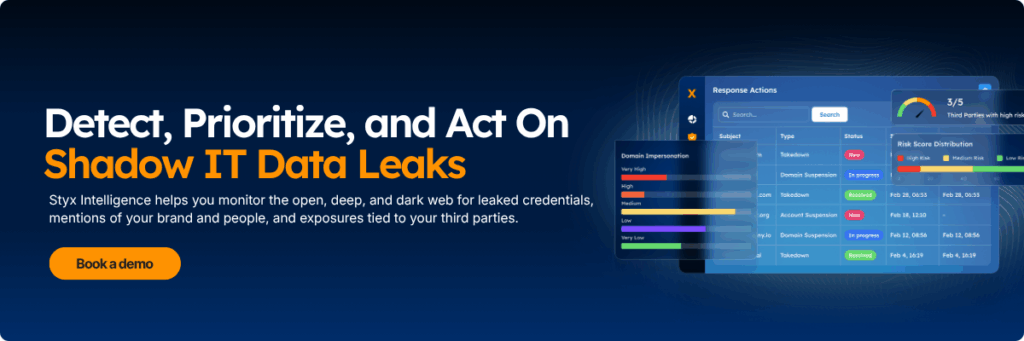
This is the shift: shadow IT is not only managed by finding unapproved tools inside the company. It also requires finding the data, accounts, and assets that have already moved outside normal control.