
What Business Email Compromise Actually Is
Business email compromise, or BEC, is a targeted scam where an attacker uses trusted business identities to get money, data, or account access.
That trusted identity could be:
| Impersonated identity | What the attacker wants |
| Executive | Payment approval or sensitive files |
| Vendor | Bank-detail changes or invoice payment |
| Lawyer | Confidential transfer or deal-related funds |
| HR employee | Payroll changes or employee data |
| IT contact | Access, reset approval, or account details |
BEC is not one scam. It is a category.
CEO fraud is one type of BEC, for example. Vendor email compromise is another. Payroll diversion, attorney impersonation, and data theft also sit under the same umbrella.
The FBI describes BEC as a costly online crime where attackers use email to trick people into sending money or sensitive information.
BEC is also different from phishing.
Phishing often pushes a broad audience to click a link, download a file, or enter a password.
BEC is usually more targeted. The attacker studies the company, chooses the right person, and sends a request that fits their role.
That is why it slips through.
The message may not look strange. It may look like normal business, sent from the wrong identity at the right moment.
How Bad Are Business Email Compromise Attacks Right Now
BEC is still one of the highest-loss cybercrime categories.
In 2025, the FBI received 24,768 BEC complaints, with reported losses of $3.04 billion in the IC3 2025 Annual Report.
That made BEC the second-largest cyber-enabled fraud category by reported loss, behind investment fraud. The same FBI report put total 2025 IC3 losses at $20.87 billion, across more than 1 million complaints. FBI IC3 2025 Annual Report
A quick way to read that:
| 2025 IC3 category | Reported losses |
| Investment fraud | $8.64B |
| Business email compromise | $3.04B |
| Tech support scams | $2.13B |
| Personal data breach | $1.31B |
And the public numbers still understate the issue.
The FBI report only reflects incidents reported to IC3. Many companies do not report failed attempts, near misses, or fraud stopped before money leaves the account.
So the better question is not, “Is BEC still happening?”
It is: How early can your team see the attack forming?
The Five Common Types of BEC
BEC usually shows up in one of five ways.
| Type | What it looks like | Why it works |
| CEO fraud | An attacker impersonates a senior executive and asks finance to approve a payment, share a file, or act outside normal process. | The request carries authority. People hesitate to challenge senior leaders. |
| Invoice fraud | A fake or compromised vendor asks accounts payable to send payment to a new bank account. | The vendor may already be known, so the change feels routine. |
| Payroll diversion | An attacker pretends to be an employee and asks HR or payroll to change direct deposit details. | The request is small enough to seem administrative, not suspicious. |
| Attorney impersonation | An attacker poses as a lawyer handling a deal, dispute, or confidential transaction. | Legal pressure and confidentiality make people less likely to verify. |
| Data theft | An attacker asks for tax forms, employee records, customer files, or account details. | No money moves at first, so the request can feel less urgent to security teams. |
The details change, but the pattern stays the same.
Someone trusted appears to ask for something normal, urgent, or confidential. That is what makes BEC hard to catch from the inbox alone.
Why Most BEC Attacks Slip Past Email Security
Email security still matters.
But it often sees Business Email Compromise too late.
The problem is that many BEC attacks are built to look like normal business. No strange file, obvious malware, or a messy link. Just a request that sounds and feels familiar enough to your team to fall for it.
Here’s where the old model breaks:
| Control | What it helps with | Where it falls short |
| Email gateway | Scans messages for known malicious links, files, sender patterns, and policy violations. | Many BEC emails are plain text requests with no attachment or link to inspect. |
| DMARC | Helps stop attackers from spoofing your exact domain. | It does not stop someone from registering a separate lookalike domain and sending email from that domain. |
| Security training | Helps people slow down, question requests, and report suspicious messages. | It still asks employees to catch a well-timed request under pressure. |
That last point matters.
Training helps, but it cannot carry the whole defence. A 2025 study of more than 12,000 employees found that common anti-phishing training methods did not produce a significant effect on click rates or reporting rates in that environment.
On the other hand, DMARC has a clear boundary.
The UK National Cyber Security Centre explains that DMARC helps stop phishers from spoofing your domain. That is useful. You should still do it. But a cousin domain is different…
If your company uses:
yourcompany.com
An attacker can register something like:
yourcornpany.com
yourcompany-payments.com
yourcompany.co
That domain can have its own DNS records, its own mail setup, and its own authentication. Your DMARC policy does not control it.
So email protection is incomplete.
By the time an email reaches your team, the attacker may have already done the important work:
- Chosen the employee
- Picked the right business process
- Registered the domain
- Activated mail records
- Copied the brand details
- Sent the request at a moment that feels believable
That is why “catch it in the inbox” is not enough.
It catches the attempt at the point of pressure, not at the point of preparation. It’s too late!
The Stage Most Teams Miss: What Attackers Do Before the Email
As you just saw, before that message/email reaches your team, the attacker probably already built enough infrastructure to look credible.
However, that setup can leave public signals your team can monitor.
Think of it as the pre-email window.
These are some of those signals:
| Signal | What it means | Why it matters |
| Lookalike domain registration | A new domain appears that resembles your brand, an executive, or a vendor. | It gives the attacker a sender identity that looks close enough to trust. |
| MX record activated | The domain now has mail records. | The domain can send and receive email, which raises its risk. |
| Mail server and certificate added | The domain gets working mail infrastructure and may receive a TLS certificate. | It starts looking more legitimate to systems and people. |
| Brand details copied | Logos, colours, page titles, wording, or layouts appear on the site. | The attacker can support the email with a page that feels familiar. |
This matters because these steps happen outside the inbox.
A 2025 academic study on phishing domains found that 66.1% of the phishing domains in its dataset were maliciously registered, and that many mimicked brand domains under different top-level domains.

That does not mean every BEC attack uses a newly registered domain.
But it does show why domain registration is a useful place to look.
Not every lookalike domain becomes a BEC attack. Some stay parked. Some support fake login pages. Some redirect to scams. Some are never used.
But a lookalike domain with active mail records is different.
It means the domain can communicate.
A few examples:
| Your domain | Suspicious lookalike |
| company.com | cornpany.com |
| company.com | company-payments.com |
| company.com | company.co |
| company.com | secure-company.com |
| company.com | company-vendor.com |
The trick is not always a typo.
Attackers can swap letters, add trusted words, use a different domain ending, or create a supplier-themed domain that looks connected to an invoice process.
Once that domain has mail records, a sender can use it.
That is the missed window.
Most teams start investigating after someone receives the message.
A better workflow starts when the infrastructure appears:
- A domain similar to your brand gets registered.
- Mail records turn on.
- A certificate appears.
- A page starts using your logo or language.
- The same registrar, host, or mail provider appears across related domains.
Each signal adds context.
One signal may be noise. However, several together can show preparation.
That gives your team something valuable: time.
- Time to review the domain.
- Time to collect evidence.
- Time to start a takedown.
- Time to warn finance before the request arrives.
What to Watch For: A Practical Checklist for BEC
Let’s quickly summarize all the signals and what you must pay attention to.
Outside your inbox: the early window
Watch for signs that someone is preparing to impersonate your company, your executives, or a trusted vendor.
Look for:
- New domains similar to your brand, especially typos, swapped letters, missing letters, added words, or different endings.
- Domains close to executive names, especially when the executive has public visibility.
- Domains close to vendor names, because invoice fraud often starts with supplier impersonation.
- MX records on suspicious domains, because that means the domain can receive mail.
- New certificates tied to brand-similar domains, because attackers may prepare a working site behind the email.
- Copied logos, colours, page titles, or brand language, especially on pages that mention login, payment, support, invoices, HR, or procurement.
- Mentions of your company, executives, finance team, or vendors in criminal forums or leak channels, especially when paired with exposed credentials or payment language.
Inside the email: the “late” window
You still need inbox-side checks.
Just treat them as the last layer, not the first one.
Watch for:
- Sudden urgency, especially around payment deadlines, deal closings, payroll, or vendor updates.
- Bank-detail changes, especially from a vendor your team already pays.
- Gift card or small-value purchase requests, especially when the sender asks for codes by email.
- Slightly wrong display names or domains, such as one changed letter or a different domain ending.
- Requests to move the conversation, such as “text me on WhatsApp” or “use my personal email.”
- Confidentiality pressure, such as “do not discuss this with anyone yet.”
- Process bypasses, such as skipping callback checks, dual approval, or normal vendor verification.
Here’s the rule:
If the message asks someone to transfer money, change payment details, share sensitive data, or bypass a known process, do not judge it by tone or the person alone… double and triple check.
How to Take BEC Attacks Down at the Infrastructure Stage
Finding the domain is only useful if your team can act on it.
The goal is not to investigate forever.
The goal is to decide whether the domain is high risk, collect enough proof, and move it toward disruption before the first convincing email is sent.
Here’s a practical flow.
1. Monitor the names attackers are likely to abuse
Start with your company name, main domain, product names, executive names, and high-risk vendors.
Then watch for close variants, such as:
- Missing letters
- Swapped letters
- Lookalike characters
- Extra words like pay, secure, login, support, invoice, or careers
- Different endings, such as .co, .net, .org, or Country-code domains
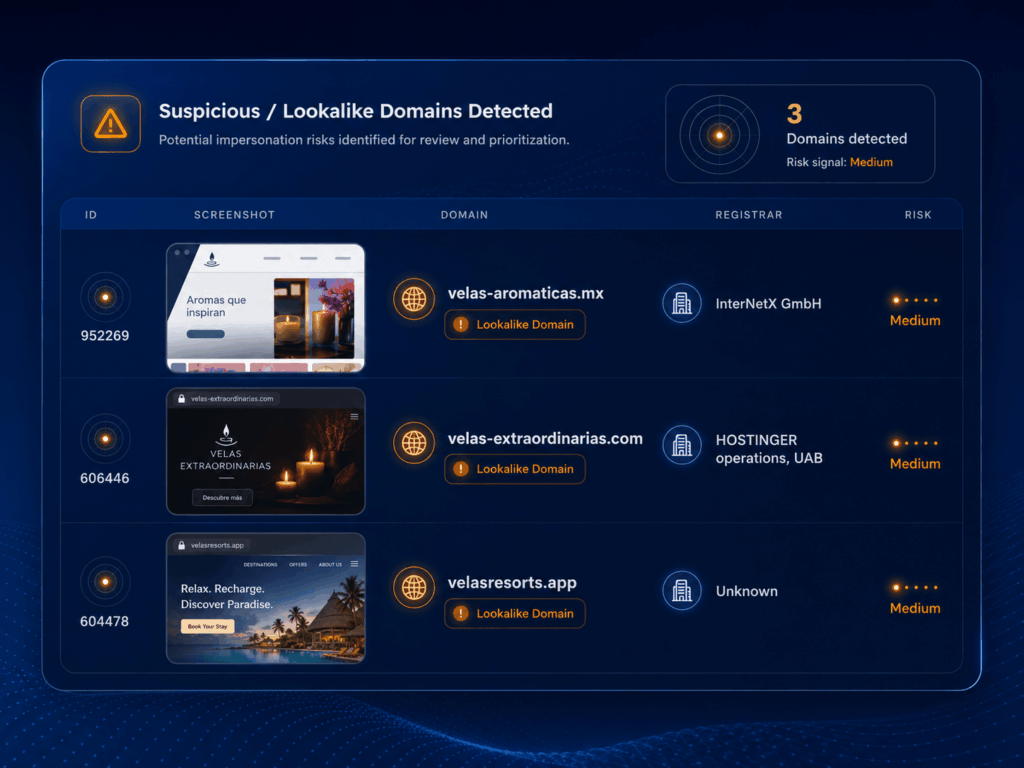
A 2025 study of phishing domains found that attackers often mimic brand domains under alternative top-level domains, which makes domain monitoring a useful early detection point.
2. Score the domain by behaviour, not just similarity
A domain that looks close to yours is worth reviewing.
A domain that looks close to yours AND has mail infrastructure deserves action now.
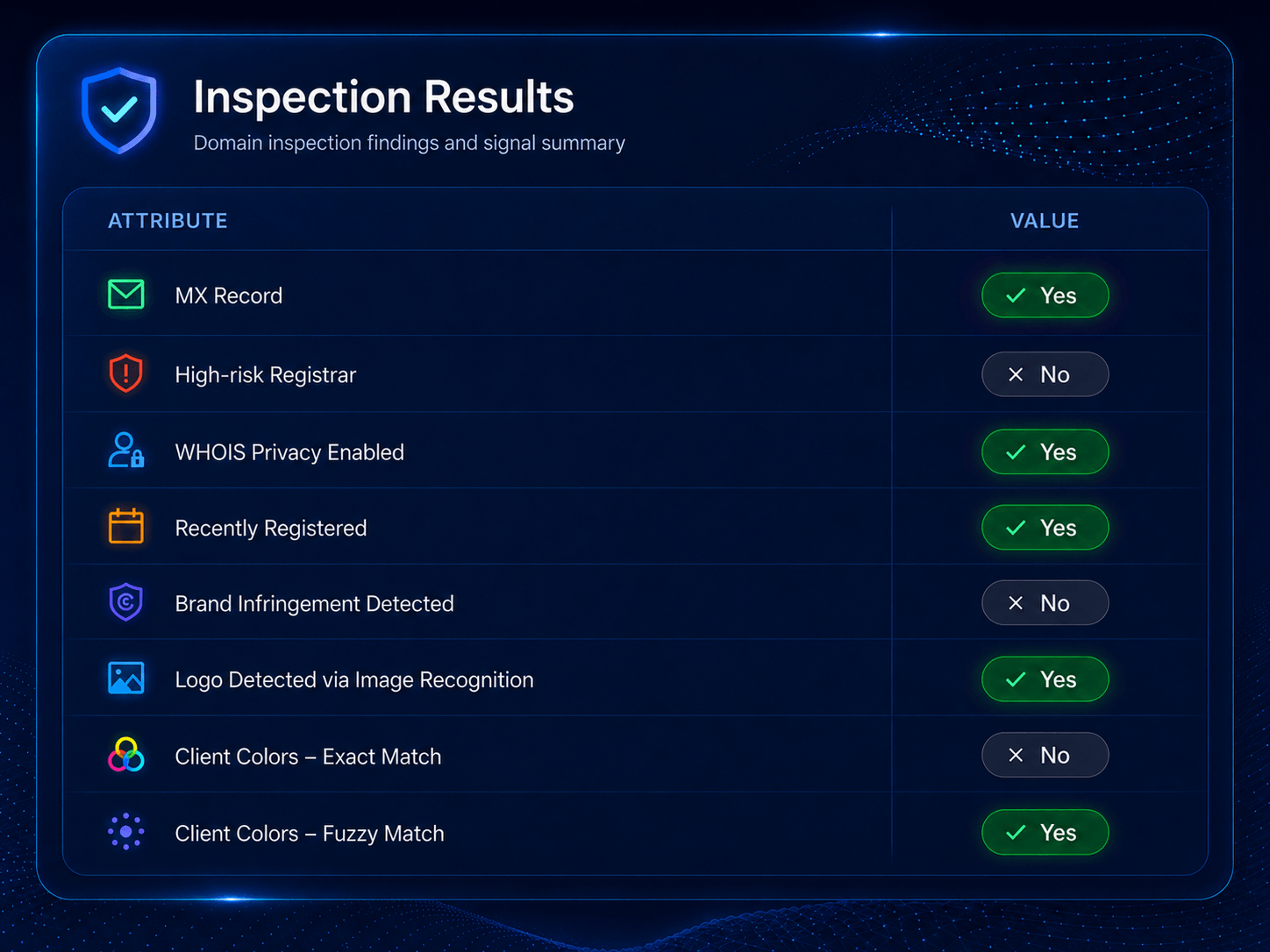
Prioritize domains when you see signals like:
- Recent registration
- Active MX records
- A working mail server
- A certificate tied to the domain
- A live page using your logo, colours, or wording
- Redirects to a login page, payment page, or file-sharing page
- Hosting or registrar patterns seen in earlier abuse
The point is context.
One signal might be noise. Several signals together can show intent.
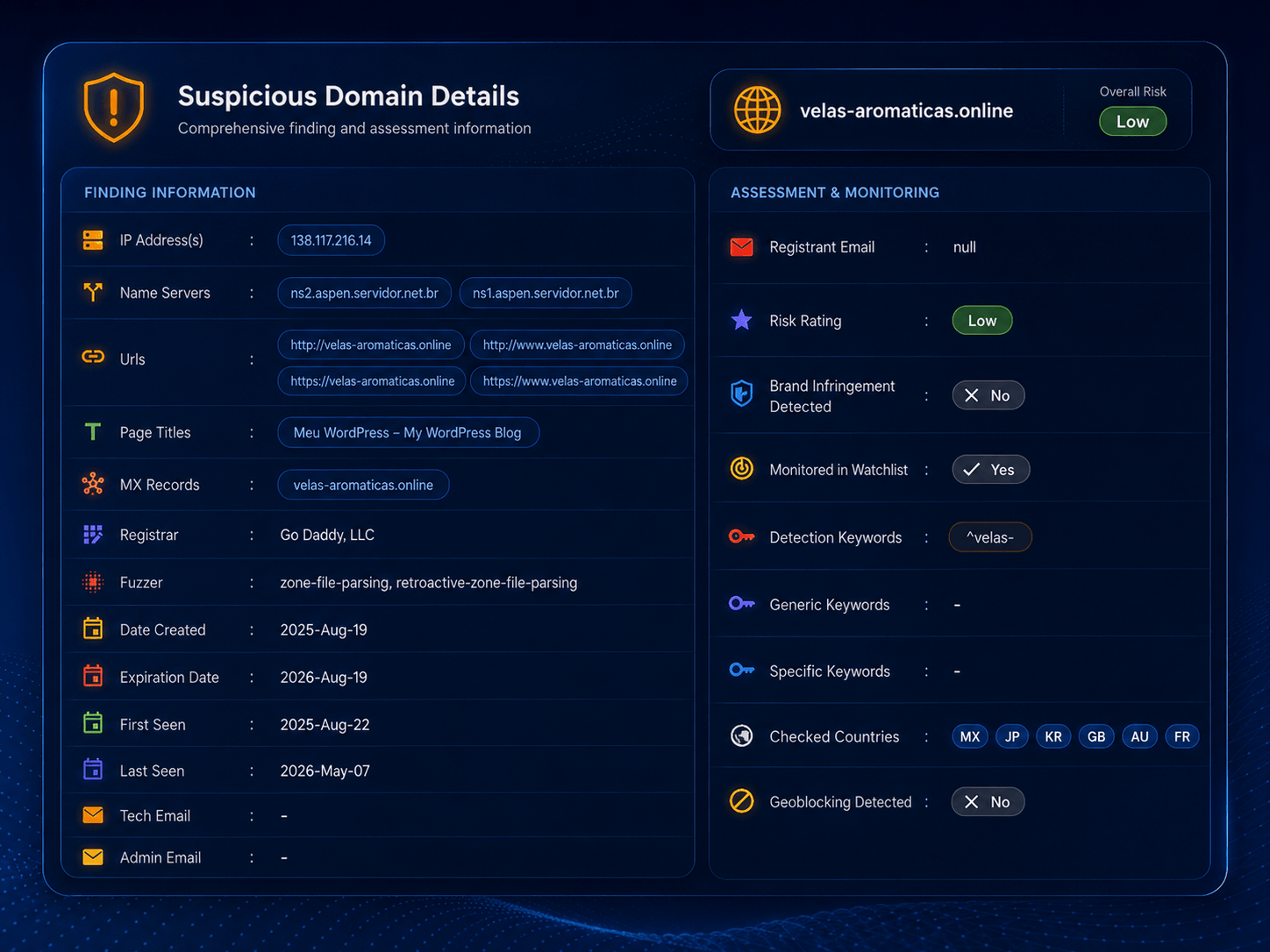
3. Gather evidence before you report it
Do not send a vague abuse report that says, “This domain looks suspicious.”
Collect proof.
That usually means:
- Domain name and URL variants
- WHOIS or registrar details
- DNS records, including MX records
- IP address and hosting provider
- Screenshots of the live page
- Page title and visible brand use
- Certificate details, where relevant
- Email headers, if a message has already landed
4. Submit the takedown to the right parties
Send the report to the infrastructure owner that can act.
That may include:
- The registrar, if the domain itself is abusive.
- The hosting provider, if the fake website is live.
- The email provider, if the domain is being used to send messages.
- The certificate authority, if a certificate supports a phishing or impersonation page.
- The social or marketplace platform, if the domain is part of a wider impersonation campaign.
Do not rely on one report if several layers are involved.
A domain can stay registered even after the site goes offline. A site can go down while the mail records stay active. Treat each layer as its own action path.
5. Track what happens next
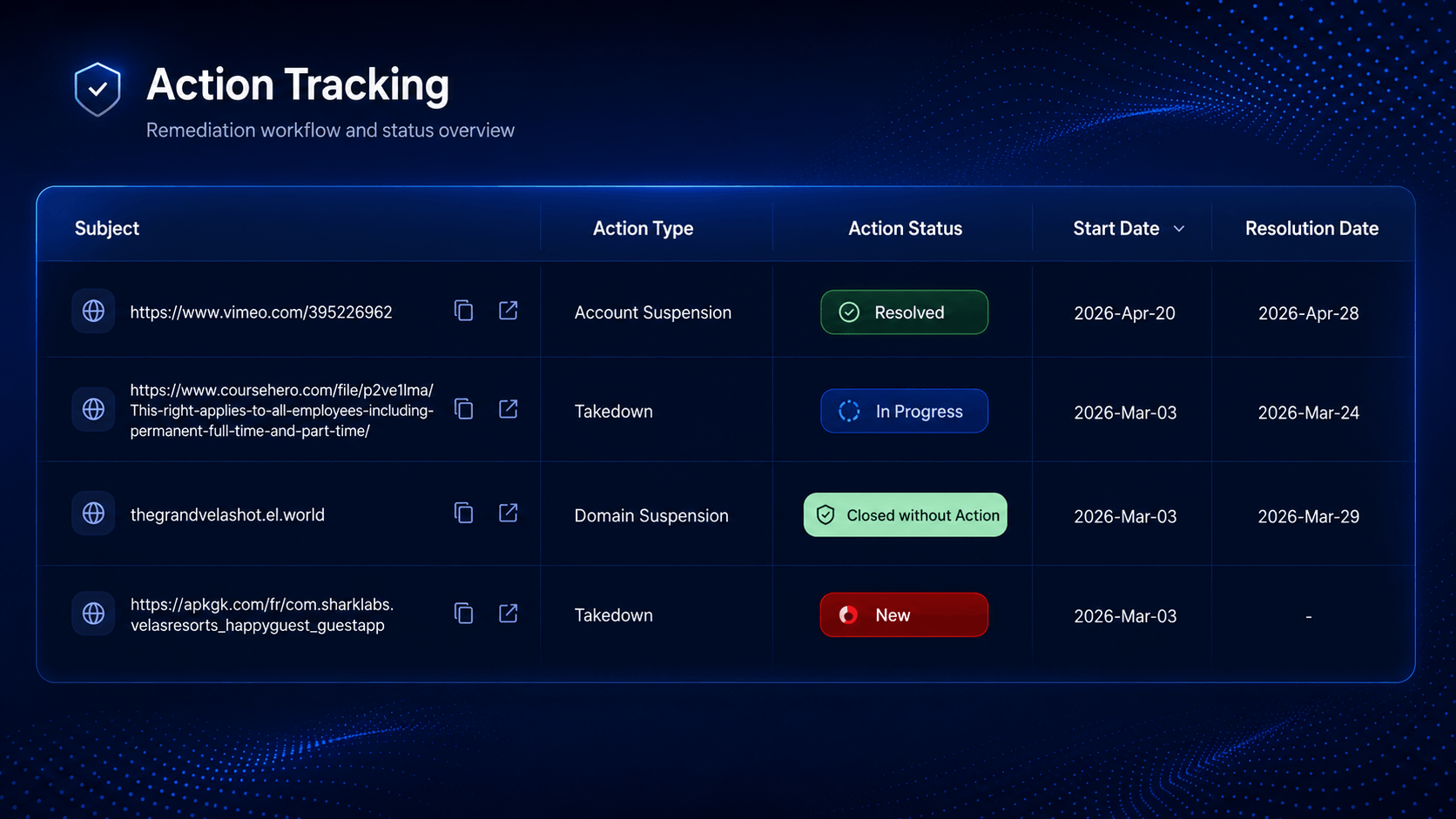
A takedown is not always the end.
Attackers can come back with a new domain, a new host, or a small variation on the same name.
So track:
- Was the domain suspended?
- Did the website go offline?
- Did the MX record disappear?
- Did a similar domain appear later?
- Did the same registrar, host, or mail provider show up again?
- Did finance, HR, or procurement receive related messages?
This turns one takedown into pattern recognition.
That matters because BEC is rarely about one domain in isolation. It is often about repeatable setup, repeatable language, and repeatable infrastructure.
The Shift in How To Think About BEC
The old model treats BEC as an inbox problem.
That makes sense on the surface because the request arrives by email. But the email is only the final step. The attacker may have already chosen the target, created the domain, activated mail records, copied brand assets, and shaped the request around a process your team already trusts.
The better model treats BEC as an infrastructure problem with an inbox endpoint.
Catching it in the inbox means catching it when someone is already under pressure. Catching it at the domain means catching it while the attacker is still setting up. That is the better window. Less pressure, more evidence, more time to act.
Styx Intelligence helps your team detect lookalike domains, mail-ready infrastructure, and impersonation signals before the request reaches the inbox. Connect with our team.