

What Is a Digital Footprint in Cybersecurity?
Your digital footprint is every online asset, account, system, and data trail tied to your company.
That includes the assets your team owns directly, such as:
- Domains and subdomains
- IP addresses
- Cloud services
- Login pages
- Customer portals
- Mobile apps
- Social media accounts
- Public repositories
- Digital certificates
It also includes assets that sit outside direct control, such as vendor-hosted pages, third-party SaaS tools, exposed documents, leaked credentials, executive profiles, fake domains, and brand mentions across public and private channels.
This is why digital footprint management matters. IBM explains that a digital footprint can include active data, like posts and forms, and passive data, like browsing activity and technical traces. For companies, that footprint becomes part of the security picture because each exposed asset can create a path into systems, people, customers, or brand trust.
Here is the part teams often miss:
| What the business sees | What security may need to check |
| A campaign site | Is it still live, owned, patched, and protected? |
| A test environment | Is it exposed to the public internet? |
| A vendor-hosted page | Does it use the brand, collect data, or link to customer flows? |
| A forgotten subdomain | Does it still point to old infrastructure? |
| A leaked employee account | Can attackers reuse it for access or pretexting? |
A company may know about its main website, primary cloud environment, and corporate social accounts. But the full footprint is wider than the official inventory. It includes the things created during launches, migrations, vendor projects, hiring campaigns, product tests, and old business units.
Digital footprint management gives your team a working view of what exists, who owns it, what risk it creates, and what needs to happen next.
Why Does a Company’s Digital Footprint Keep Growing?
A company’s digital footprint keeps growing because the business keeps creating new online assets.
Some are planned, some are temporary, and some come from teams that do not think of them as security assets.
Common examples include:
- Marketing launching campaign pages, forms, and tracking domains
- Developers testing apps, APIs, storage, and admin panels
- Vendors hosting portals or branded customer flows
- HR posting jobs and collecting applicant data
- Regional teams creating local domains or social accounts
- M&A activity bringing in acquired domains, systems, and old tools
That growth is normal. The risk starts when no one tracks what still exists.
For example:
- A product launch can expose test apps, demo pages, and old landing pages.
- A marketing campaign can expose landing pages, forms, and tracking domains.
- A cloud project can expose storage buckets, APIs, and admin portals.
- A vendor rollout can expose hosted pages, shared tools, and branded portals.
- Acquisition can expose old domains, duplicate systems, and inherited assets.
This is why a static inventory falls behind. The UK National Cyber Security Centre’s EASM buyer’s guide says external attack surface management tools support continuous monitoring and automated asset discovery, often refreshing daily.
That matters because the shorter the gap between exposure and discovery, the sooner your team can fix or remove the asset.
The key issue is ownership.
When an asset has an owner, someone can patch it, renew it, monitor it, secure it, or remove it. When no one owns it, it can stay online long after the business has stopped using it.
Digital footprint management gives teams a way to keep up with that growth. It helps them see what exists, protect what still matters, and remove what no longer needs to be online.
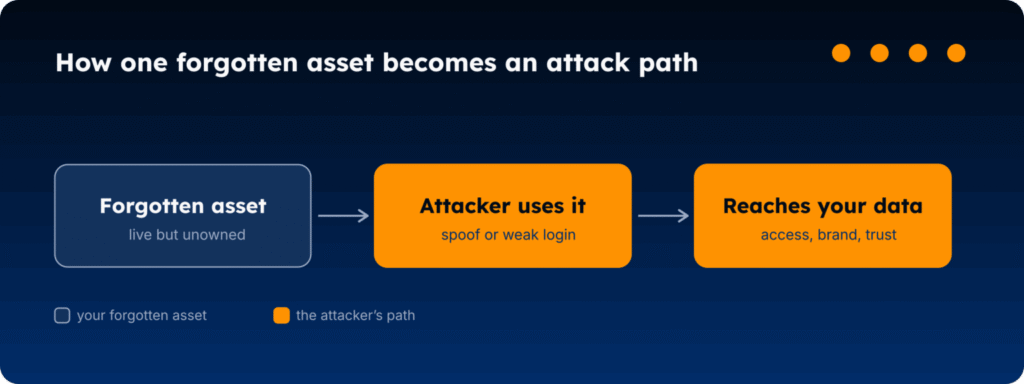
How Can One Forgotten Asset Become An Attack Path?
One forgotten asset can create risk because it still connects to something.
That connection may be technical, like an old login page, exposed API, open storage bucket, or outdated server. It may also be human, like a vendor portal, recruiter page, fake support flow, or domain that still looks tied to your company.
The asset may look small. The path it creates can be bigger.
Here’s how that can happen:
| Forgotten asset | Why it matters | What it can lead to |
| Old subdomain | It may still point to outdated infrastructure | Exploitation, takeover, or phishing setup |
| Unused domain | It may lack proper email controls or renewal ownership | Spoofing, impersonation, or brand abuse |
| Exposed dev environment | It may reveal test data, admin panels, or app logic | Unauthorized access or data exposure |
| Vendor-hosted page | It may collect customer or employee information | Fraud, data leakage, or trust damage |
| Public cloud storage | It may expose files that were never meant to be public | Sensitive data exposure or compliance risk |
The issue is not only that an asset was forgotten. The issue is that it may still sit in public, connect to the business, and fall outside normal security review.
That gives attackers room to build around it.
For example, an attacker does not need to compromise your main website if they can find an old page that still uses your brand, runs weak software, or links to a login flow. They can use that asset to make a scam feel familiar, collect information, or move someone toward a fake process.
The UK National Cyber Security Centre’s EASM buyer’s guide frames this as a visibility problem. External attack surface management helps organizations discover and monitor internet-facing assets so they can reduce the time between exposure, discovery, and mitigation.
The longer an unused asset stays online, the longer it can be found, copied, abused, or connected to a larger attack. Digital footprint management reduces that gap by giving teams a clear process:
- Find the asset.
- Confirm who owns it.
- Check whether the business still needs it.
- Secure it if it stays online.
- Remove it if it creates risk without value.
That is the core idea. A forgotten asset becomes dangerous when it remains visible, connected, and unowned.
Why do Old Security Workflows Miss Digital Footprint Risk?
Old security workflows usually start with what the team already knows.
That creates a gap.
Most programs are built around known assets: the approved cloud environment, the corporate domains, the managed endpoints, the main applications, and the systems listed in the asset inventory.
Those controls still matter. But forgotten assets often sit outside that view.
Where the old approach breaks
| Old approach | What it misses |
| Static asset inventory | Assets created after the last inventory update |
| Yearly penetration test | Short-lived assets that appear between tests |
| Internal vulnerability scan | Public-facing assets not tied to managed networks |
| Firewall and endpoint controls | Domains, SaaS tools, vendor-hosted pages, and exposed brand assets |
| Manual ownership tracking | Assets created by teams outside IT or security |
The problem is timing and scope.
A yearly test can only assess what exists during that window. A static inventory only reflects what someone recorded. Internal scans only check what they can reach. None of these gives your team a current view of everything connected to the company from the outside.
This matters because unknown assets are already part of the risk picture. Enterprise Strategy Group research, reported by TechTarget, found that 76% of organizations experienced a cyberattack caused by an unknown, unmanaged, or poorly managed internet-facing asset.
This is the takeaway:
If your process only protects the assets you already know about, it will keep missing the assets that no one recorded.
The old approach waits for the asset to appear in a scan, a ticket, a test, or worse, an incident.
Digital footprint management looks for it before it becomes one.
What Does Digital Footprint Management Actually Involve?
Digital footprint management is not just about finding assets.
Discovery tells your team what exists. Management tells your team what to do with it.
The goal is to answer a few practical questions:
- What exists online?
- Who owns it?
- Does the business still need it?
- Is it configured properly?
- Does it touch customers, employees, data, infrastructure, vendors, or brand trust?
- Should it be secured, monitored, reassigned, or removed?
A useful process looks like this:
- Discover: Find domains, subdomains, cloud services, SaaS tools, vendor-hosted pages, social accounts, certificates, and exposed data tied to the company.
- Validate: Confirm whether each asset is legitimate, active, owned, abandoned, duplicated, or suspicious.
- Prioritize: Focus on assets that create access, data, impersonation, or brand risk.
- Act: Patch, secure, monitor, transfer ownership, or remove assets that no longer need to exist.
- Track: Keep checking that fixed assets stay fixed and that removed assets do not reappear.
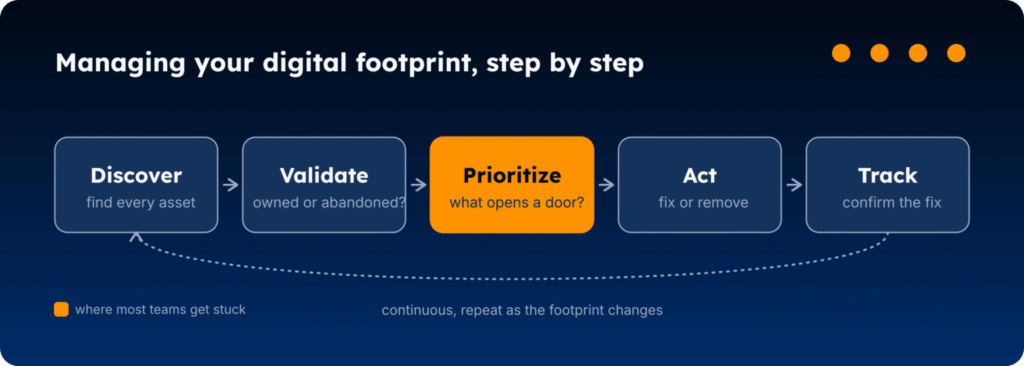
The order matters.
A long list of assets does not help if your team cannot tell what needs attention first. That is where many programs get stuck. They find more exposure, but they do not have enough context to decide what matters.
A better question is:
Which assets create a path to access, data, customers, employees, infrastructure, vendors, or brand trust?
That question helps your team sort the work.
For example:
| Asset | Likely action |
| Exposed admin panel | Restrict access, investigate, and fix quickly |
| Vendor page collecting customer data | Confirm ownership, data flow, and controls |
| Old brochure page | Review ownership and remove if no longer needed |
| Unused domain | Confirm renewal, email controls, and business purpose |
| Unknown subdomain | Validate what it points to and who owns it |
This is where digital footprint management connects to asset management. CISA’s Cybersecurity Performance Goals recommend keeping an updated inventory of organizational assets with an IP address, at least monthly for IT and OT assets.
This is an important point: assets need to be known, owned, reviewed, and kept current.
Managing the footprint gives your team a way to stop treating every exposed asset the same. Some need stronger controls. Some need an owner. Some need monitoring. Some need to be removed because they no longer belong online.
How Can Your Team Start Managing its Digital Footprint?
Start with the assets that could cause the most damage if they are forgotten, exposed, or left unmanaged.
You do not need to map everything perfectly on day one. The first goal is to find the places where your company is visible, exposed, or still connected to old systems, tools, and workflows.
Use this as a starting checklist:
| What to check | What to look for |
| Domains | Main domains, old domains, campaign domains, regional domains, and domains no one clearly owns |
| Subdomains | Unknown subdomains, old environments, redirects, login pages, and services still resolving |
| Cloud assets | Public storage, exposed apps, APIs, admin panels, and test environments |
| SaaS tools | Tools used by marketing, HR, sales, support, vendors, and regional teams |
| Vendor-hosted pages | Branded portals, customer forms, applicant flows, and partner-managed pages |
| Email controls | SPF, DKIM, and DMARC status across active and unused domains |
| Public data exposure | Leaked credentials, exposed documents, public repositories, and sensitive files |
| Brand and executive exposure | Fake profiles, lookalike domains, unauthorized pages, and impersonation attempts |

A good first pass should answer three questions:
- What should stay online?
These assets need clear ownership, monitoring, and controls.
- What should be fixed?
These assets still serve a purpose, but need security updates, access restrictions, DNS changes, or stronger email protection.
- What should be removed?
These assets no longer support the business and create more risk than value.
This work also needs a cadence. A review once a year is not enough for a footprint that changes through campaigns, cloud projects, vendor work, product launches, and staff changes.
A practical rhythm could look like this:
- Weekly: Review high-risk new findings.
- Monthly: Check unknown assets, ownership gaps, and exposed services.
- Quarterly: Review old domains, unused tools, vendor-hosted assets, and expired campaigns.
- After major changes: Recheck the footprint after acquisitions, migrations, rebrands, product launches, or new vendor rollouts.
The point is not to create another spreadsheet no one trusts, but to build a working process that keeps your digital footprint visible, owned, and current.
Styx Intelligence gives security teams a current view of the assets and risks that sit outside the firewall. Map your digital footprint (and identify risks), continuously monitor domains, social media profiles, executives, vendors, and exposed data.
If attackers are trying to impersonate your brand, domain, executive, or online presence, Styx Intelligence helps you identify it, score and prioritize it, and take it down from one platform.