
What is Social Engineering in Cyber Security?
Social engineering is the practice of manipulating a person into giving up information, access, or money, instead of breaking through technology. Government security guidance calls it the art of getting someone to break their own security steps.
The target is a human decision, not a system, a tool, or a firewall… It is much simpler than that. An attacker who can convince an employee to approve a payment or reset a password does not need to defeat your defences at all.
Here is the difference at a glance:
| Traditional hacking | Social engineering | |
|---|---|---|
| Target | Software, networks, devices | People and their decisions |
| Method | Find and exploit a technical flaw | Build trust, then ask |
| Defeats | A missing patch or weak setting | A moment of judgment |
| Stopped by | Patching, firewalls, antivirus | Verification and less exposure |
Social engineering often gives security tools nothing to detect.
There may be no malware, suspicious link, or unusual network activity. The attack can look like a normal payment request, support call, or password reset.
The interaction looks like ordinary business, which is the whole point.
Why Does Social Engineering Work, Even On Careful People?
It works, even on careful people, because it targets the instincts and daily habits that help you do your job, and those do not switch off because you passed a training course.
Attackers use the same five pressure points again and again:
| Trigger | How an attacker uses it |
|---|---|
| Authority | Poses as a CEO, IT admin, or auditor whose request you would not push back on |
| Urgency | Sets a deadline so you act before you think, like a wire that “has to go out today” |
| Familiarity | Copies a brand, a colleague, or an internal email format you already trust |
| Helpfulness | Counts on your instinct to assist a coworker or a waiting customer |
| Fear | Warns of a locked account or a missed invoice to push a quick fix |
Familiarity does the heaviest lifting. In KnowBe4’s most recent phishing research, internal-looking topics made up 90% of the subject lines people clicked most, with fake HR notices at the top. A message that looks like routine HR or IT business gets less scrutiny, which is exactly why it lands.
Btw, none of this depends on a careless target.
The same triggers work on engineers, finance leads, and security staff, because the attacker is not testing knowledge. They borrow trust you have already given to a brand, a boss, or a coworker.
Key takeaway: Social engineering works because the request feels familiar, not because the person is careless. The attacker borrows trust from a name, role, or process your team already recognizes.
What Are The Main Types of Social Engineering Attacks?
The main types of social engineering share one idea: build a reason to trust the message, then make the request. Just remember, they differ by channel and target.
Here are the ones you will meet most:
| Type | How it works | Where you see it |
|---|---|---|
| Phishing | Mass fake emails that push you to click a link or hand over a login | |
| Spear phishing | A phishing message tailored to one person using details about them | Email, chat |
| Vishing | A phone call that pressures you into sharing access or information | Phone |
| Smishing | A text message with a fake link or an urgent request | SMS |
| Pretexting | An invented story or role that makes the request seem normal | Any channel |
| Baiting | A tempting offer or item, like a free download or a dropped USB | Web, physical |
| Quid pro quo | A trade, such as “tech support” help in exchange for access | Phone, email |
| Tailgating | Following an employee through a secure door without a badge | In person |
| Business email compromise (BEC) | A spoofed or hijacked executive account that requests payments | |
| MFA fatigue | Repeated login prompts until a tired user finally approves one | App, phone |
Another important question: Is phishing the same as social engineering?
Phishing is one type of social engineering, not a separate category. It is the most common type, so the two terms often get used as if they mean the same thing.
Remember: these types rarely appear alone. A single attack often combines several, such as a text that leads to a phone call, then a fake reset request to the help desk. For the full set, see Styx’s guide to social engineering tactics.
How Does a Social Engineering Attack Actually Work?
Most social engineering attacks run through the same five stages. The first two happen entirely outside your company, before anyone hears from the attacker. That is the part worth understanding, because it is where you can see the attack coming.
- Research the target: The attacker gathers public details: names, job titles, email formats, vendors, recent news, and any passwords already exposed in old breaches. This is the groundwork, and it leaves traces you can find too.
- Build the setup: Using that material, they register a lookalike domain, copy an executive’s profile, or write a script that names real coworkers and projects. The request is being prepared here, long before it is sent.
- Make contact: The message goes out by email, text, or phone, using a name or brand the target already trusts.
- Apply pressure: The attacker adds urgency, authority, or secrecy so the target acts before checking. Verizon’s 2025 DBIR found that a user who clicks a phishing link usually does so within about 21 seconds, far too quick for second thoughts.
- Cash in: The target pays the invoice, resets the password, or approves the login. The attacker uses that access to reach email, systems, or money, and often to set up the next move.
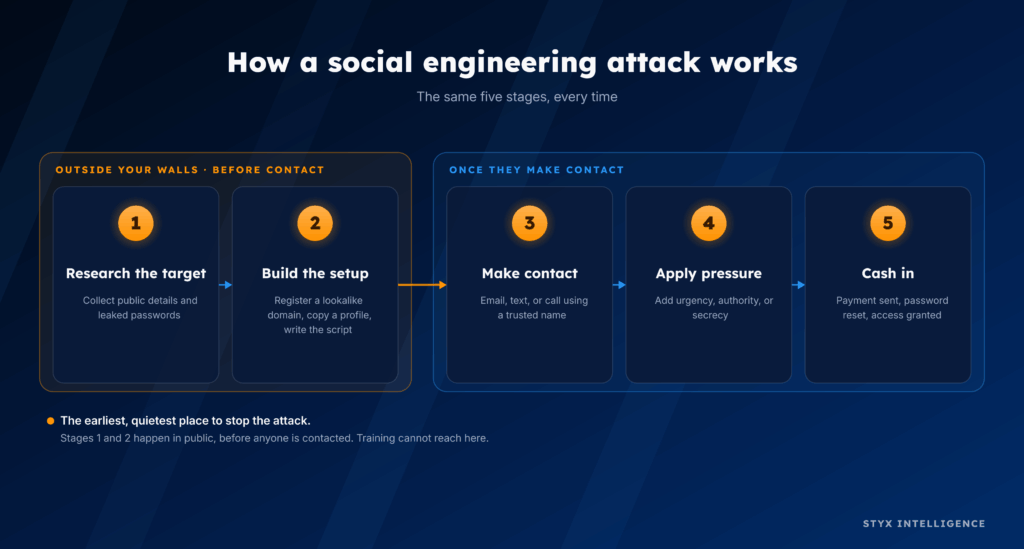
The key point: stages one and two happen in public, before any person is contacted. That is the earliest and quietest place to stop a social engineering attack, and it is the part training cannot reach.
What Are Some Examples of Social Engineering Attacks?
The clearest recent examples come from one group, Scattered Spider, using one move: a phone call to the IT help desk. Here are three from 2025.
1. Marks & Spencer (UK retailer), April 2025
Attackers impersonated M&S employees and called the help desk, run by an outside provider, with a routine-sounding login problem. The agents reset the passwords, and the attackers were in. No firewall was breached. M&S shut down online orders for 46 days. The UK’s Cyber Monitoring Centre later put the combined M&S and Co-op damage at up to $592 million.
The Co-op (UK retailer), April 2025
Days after the M&S breach, the same group ran the same trick on the Co-op. An attacker posed as a colleague and answered the help desk’s security questions well enough to get an account reset. This time the outcome was different. The Co-op caught the intrusion within minutes and pulled systems offline before the attackers could spread, so customer disruption stayed small. It was the same attacker and the same method, yet the result came down to how quickly each team noticed.
3. Aflac (US insurer), June 2025
A few weeks later the group moved to US insurance. Attackers posed as staff and talked Aflac’s support team into handing over access, with no malware involved. Aflac detected the activity on June 12 and contained it within hours. Even so, the attackers had already taken data tied to 22.65 million people, including Social Security numbers and health records. Erie Insurance and Philadelphia Insurance reported incidents in the same stretch.
As you can imagine, this playbook is not new.
The same help-desk approach hit MGM Resorts and Caesars in 2023, costing MGM an estimated $100 million and pushing Caesars to pay a roughly $15 million ransom.
The pattern: every one of these started with a believable impersonation, not a technical exploit. The help desk reset the password because the caller sounded like someone who belonged.
How is AI Changing Social Engineering?
AI has not created a new kind of social engineering, but it has made the old kind cheaper to run, quicker to build, and harder to spot. The tricks that already worked, now arrive in greater volume and with fewer tells.
Here is what AI adds:
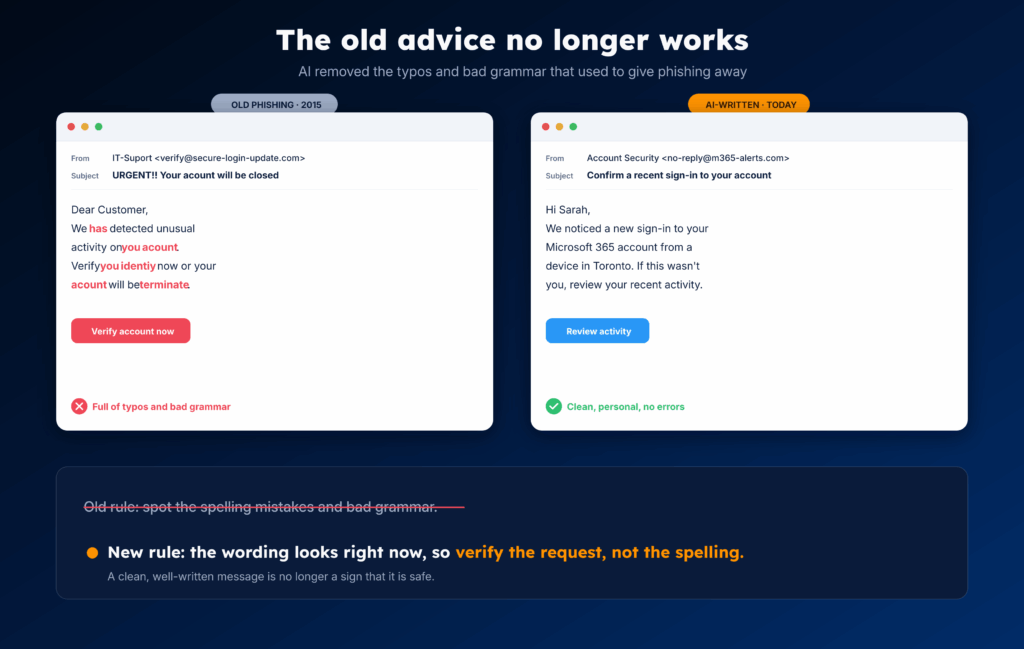
- Cleaner messages. The grammar mistakes and odd phrasing that once gave phishing away are mostly gone. AI writes fluent, on-brand English, so the old advice to “look for typos” no longer holds.
- Cloned voices and faces. Back in 2023, McAfee researchers showed three seconds of audio can produce an 85% voice match, and the cloning tools have only spread since. The clip can come from an earnings call, an interview, or a “meet the team” video. The same technology now puts a synthetic face on a video call. In McAfee’s survey, 70% of people were not confident they could tell a clone from the original.
- Speed and scale. The 2026 DBIR found attackers using AI across the attack chain to work faster, from picking targets to writing the message, so one operator can run many tailored approaches at once.
Important note: AI has raised the volume and the polish, not yet the success rate. The 2026 DBIR found AI-written text in phishing emails has doubled, yet it has not produced a measurable rise in success against teams that already detect well. The trick is the same; only the cost of running it dropped.
The same report found AI mostly runs old tricks faster, not new ones. The audio, video, and profiles attackers clone are already public, so your defence has not changed. You just need to cut what they can copy about you, and verify high-risk requests through a channel you already trust.
Why Isn’t Security Awareness Training Enough?
Training helps, but it cannot stop social engineering by itself, for three reasons.
1. It cannot get clicks down to zero
Even after training, some people still click. The median click rate on phishing tests stays near 1.5%, and training lowers that number without ever reaching zero. In a company of thousands, that small percentage is still a lot of openings.
2. It does not cover the channels attacks now use
Training and email filters mostly focused on the inbox. However, they do nothing for a phone call to the help desk, a text to someone’s personal phone, or a live chat. The 2025 attacks on M&S and the Co-op came in through the help desk, so email training would not have stopped them.
3. It puts the fix on the person
When someone falls for one of these, the natural reaction is to say they should have known better. But think about why the message looked convincing in the first place. The attacker did not guess any of it. They used your logo, they knew your CFO’s name and who she reports to, and they had a password that leaked in some old breach. All of that is already public, sitting where anyone can find it.
So when you tell your team to “be more careful,” you are asking them to spot a fake that was built from your own details, on purpose, to look believable. Being careful does nothing about the public information that made the fake work.
And leaning harder on blame can make things worse. Forrester wrote about a company that ran a fake phishing test promising staff a bonus, right in the middle of layoffs. People were angry, they made it public, and it damaged trust.
The key point: Training is worth doing, just not as your main control. Staff who train do report suspicious messages sooner, which shrinks the attacker’s time. The mistake is leaning on a yearly course to stop an attack that was built from public information before it reached an inbox.
So the defence has to start earlier. If a message only succeeds because attackers can copy your brand, clone your executives, and buy your leaked passwords, then the place to act is the exposure itself.
Reduce what they can find and copy, and watch for the setup before it reaches a person. Training is the last layer, not the first.
What Are The Red Flags of a Social Engineering Attack?
Most social engineering attempts share a handful of signs. Any one of them is a reason to slow down and verify before you act.
What should you watch for when dealing with a social engineering attack?
- Urgency: A deadline meant to make you act before you think, like a wire that has to go out today or an account about to be locked.
- Secrecy: A request to keep it quiet, skip the usual sign-off, or go around a colleague.
- A channel switch: The conversation moves to WhatsApp, Telegram, a text, or a personal number, away from systems your team can see.
- A high-risk ask: A payment, a password reset, an MFA approval, or a change to vendor bank details.
- An address that is slightly off: A lookalike domain, an extra or missing letter, or a display name that does not match the legitimate email or handle. Even if you aren’t sure about the email extension that’s being used, such as company-support.com or company-finance.com, ignore it.
That last one is the attacker’s setup showing through. The lookalike domain or fake handle was registered before the message was sent, which is why it can be caught early.
A 10-second test for any high-risk request
Stop, and verify through a channel you already trust. Look up the person’s number yourself and call them back on it, not the number in the message. For a payment or a vendor bank change, confirm with a known contact before anything moves.
The rule is: never use the contact details the request gives you.
How Do You Prevent Social Engineering Attacks?
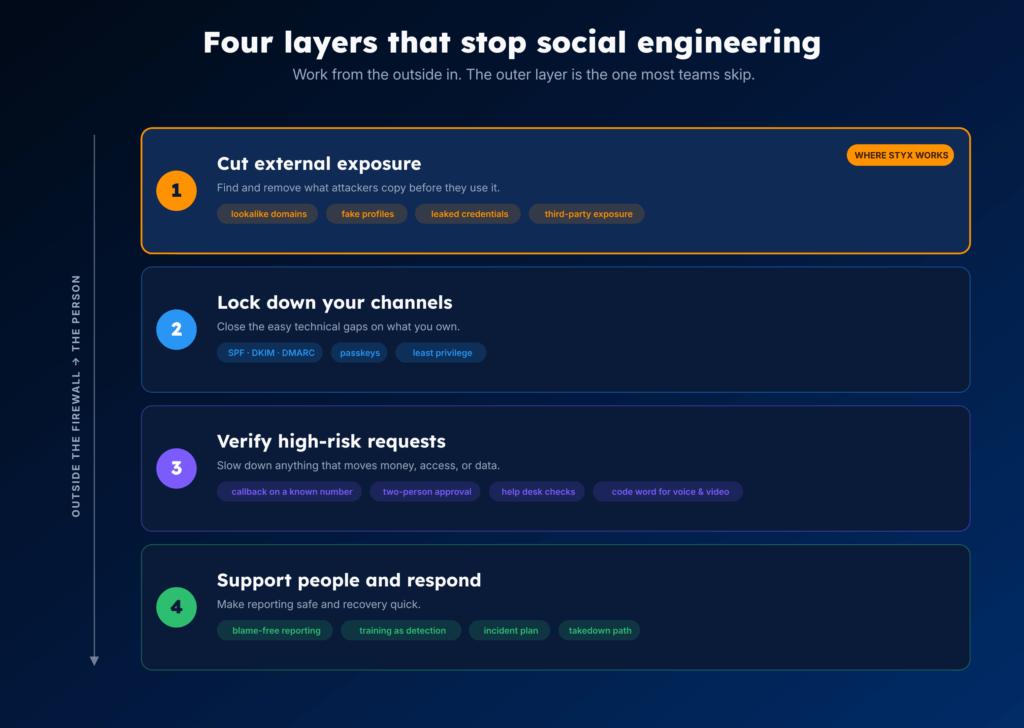
You stop most social engineering by working on three layers at the same time:
- Cut what attackers can find and copy about you.
- Slow down high-risk requests so a person checks them.
- Make your logins and your people harder to fool.
Most teams pour their effort into the third layer and skip the first. The first is where you get the most back, because it deals with the attack before it ever reaches someone.
Layer 1: Cut what attackers can find and impersonate
Before a scam reaches a person, the attacker quietly sets up the pieces in public: a lookalike domain, a fake profile of your CEO, or a password that leaked in a breach. You can watch for those and shut them down before they get used.
- Watch for lookalike domains and copycat websites, take down the dangerous ones, and register the obvious misspellings of your own domain so no one else can.
- Look for fake social and marketplace profiles, impersonated executives, and rogue apps that use your brand.
- Track leaked passwords and exposed data on breach dumps and dark web forums, so you can reset an account before someone logs in with it.
- Watch for your data leaking through a vendor, since a partner’s breach becomes your problem.
Every item you remove here is one less thing an attacker can use to look believable.
Layer 2: Lock down the channels you own
These are the standard controls that close the easy gaps. They will not stop a help desk phone call, but they take spoofing and stolen passwords off the table.
- Set up email authentication (SPF, DKIM, and DMARC set to enforce) so no one can send mail that looks like it came from your domain.
- Move to phishing-resistant logins like passkeys or hardware keys, so a stolen password or a copied code is not enough on its own.
- Give each account only the access it needs, so one compromised login cannot reach everything.
Layer 3: Slow down high-risk requests
A lot of damage comes from one rushed approval. Add a required check in front of anything that moves money, access, or data.
- Confirm any payment or vendor bank-detail change with a known contact, on a number you look up yourself.
- Require two people to sign off on large or unusual transfers.
- Give your help desk a set way to confirm who they are talking to before resetting a password or MFA. The 2025 help desk attacks worked because that step was missing.
- Agree on a code word or a callback for any request that arrives by voice or video. A cloned voice can now sound right, so hearing a familiar voice is no longer proof.
Layer 4: Make your logins and people harder to fool
You will never get clicks to zero, so make it safe to report and quick to recover.
- Make reporting a suspicious message quick and blame-free, so people flag things early instead of hiding a mistake.
- Keep training, but treat it as a way to get quicker reports, not as your main defence.
- Write down an incident response plan and practice it, so an actual event is not the first time you run it.
- Know your takedown path ahead of time, so when a fake domain or profile does go live, you can get it removed in hours, not weeks.
Two more that belong in a full plan: physical attempts, like someone tailgating into an office or leaving a USB drive in the lobby, and the same risks reaching you through a vendor or MSP. The rule does not change: verify before you trust, and limit what any single point of access can reach.
No single layer is enough alone. The controls in layers 2 to 4 handle the message once it exists. Layer 1 is what shrinks how many messages ever get built, because it removes the public material attackers rely on. That is the part you control before anyone has to make a decision.
How Styx Intelligence Finds and Takes Down The Setup Behind Social Engineering Attacks
Layer 1 is the work that happens outside your firewall, and it is what the Styx Intelligence platform is built for. It runs in four stages: map your external footprint, watch it for impersonation and leaks, rank what it finds by business impact, then take it down. Here is how each stage works.
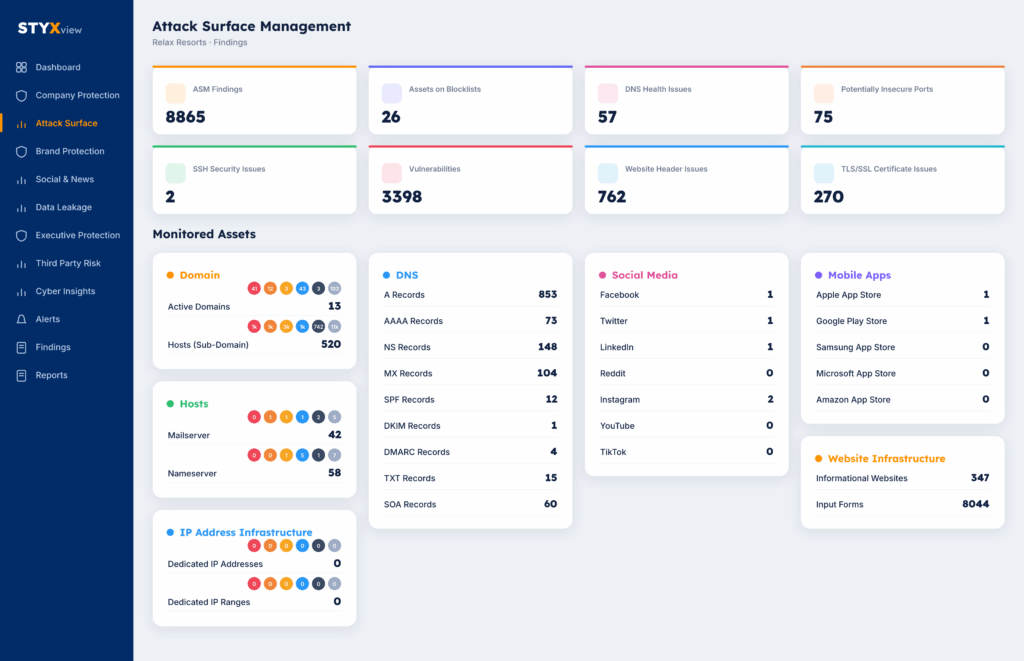
1. Map your external footprint (visibility)
Styx Intelligence first builds an inventory of everything tied to your brand in public, including assets you do not own or had forgotten about:
- Domains, subdomains, and DNS records
- Public IP ranges, cloud apps, and storage
- Social accounts and brand handles
- Executive and employee profiles
- Mobile apps and third parties using your name
- Your email security setup (SPF, DKIM, and DMARC)
This often surfaces shadow IT, like a forgotten server or app no one was tracking. The inventory is the baseline everything else is measured against.
2. Watch it for impersonation and leaks (monitoring)
With the footprint mapped, Styx Intelligence monitors the open, deep, and dark web for the pieces attackers build.
- Lookalike and evil-twin domains: One of the functionalities of brand monitoring is to generate the many ways your domain can be impersonated, such as missing letters, swapped letters, and letters that look alike, then checks those and the day’s newly registered domains against your brand keywords.
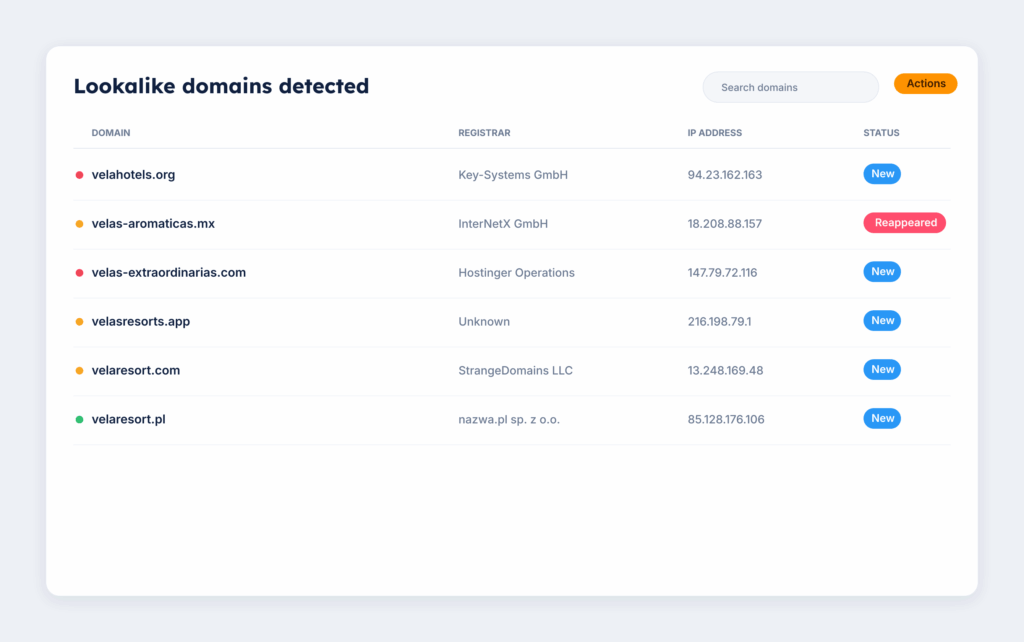
- Confirming a domain: Styx checks the name servers, mail (MX) records, hosting, and certificate, follows any redirects, reads the page content, and captures a screenshot, so you can tell a domain set up for an attack from one sitting idle.
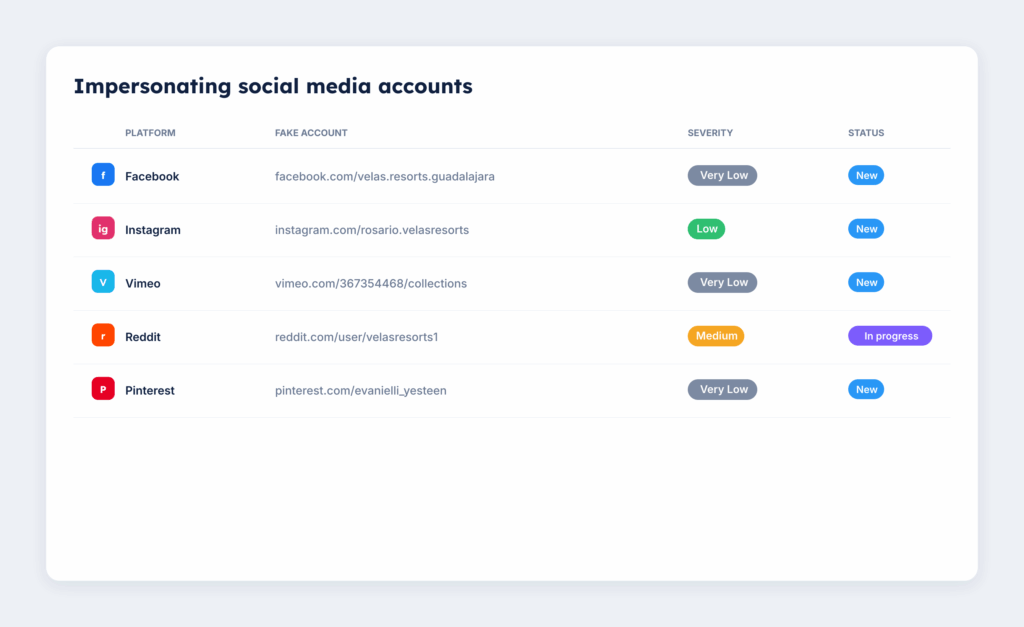
- Fake profiles, apps, and job posts: It watches social platforms, app stores, and marketplaces for impersonated accounts, cloned executives, rogue apps, and fake job postings using your brand.
- Leaked credentials and data: It monitors breach dumps, dark web forums, Telegram, paste sites, code repositories, and cloud storage for passwords, payment cards, and data tied to you.
- Third-party exposure: It flags when your email or domain turns up in a vendor or partner breach, since their incident becomes your problem.
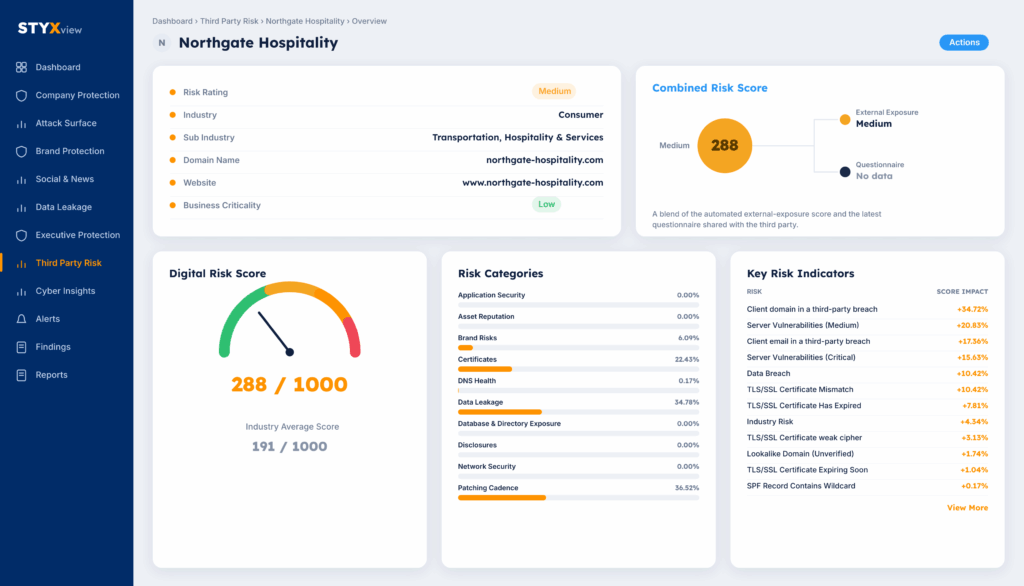
This runs continuously, with alerts when something new appears.
3. Rank it by business impact (prioritization)
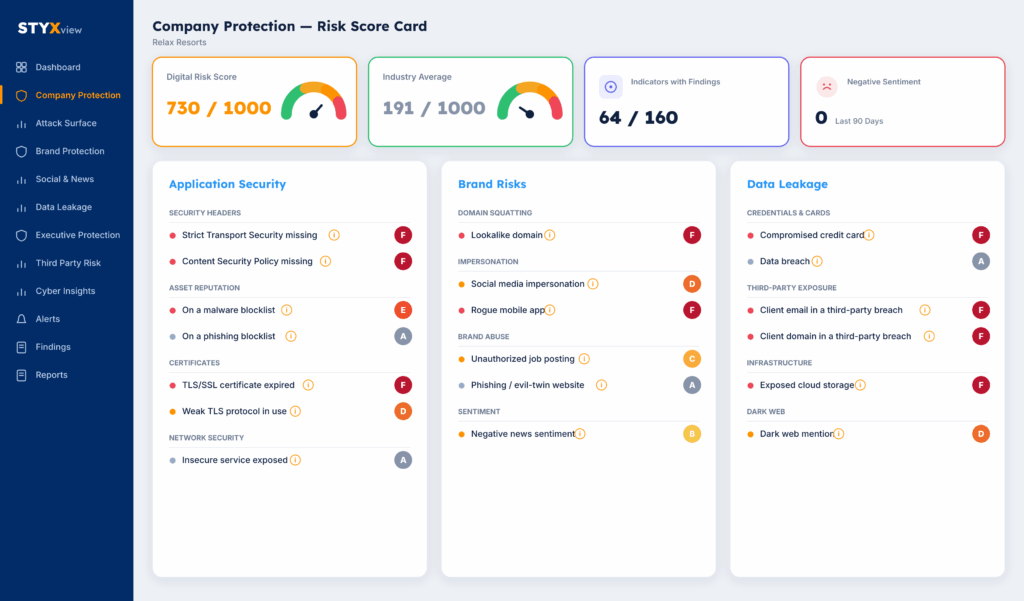
Styx Intelligence gives each finding a severity and combines them into a Digital Risk Score from 0 to 1,000, weighing business impact, the type of threat, how likely it is to be used, reputation and regulatory risk, and what is known about the actor behind it.
You see how many of the tracked indicators have findings, and how your score compares to your industry. The result is a short list of what to fix first, instead of a long list of alerts that all look the same.
Each finding arrives with its evidence: the URLs, a screenshot, the hosting and registrar details, the dates, and how it was detected.
4. Take it down
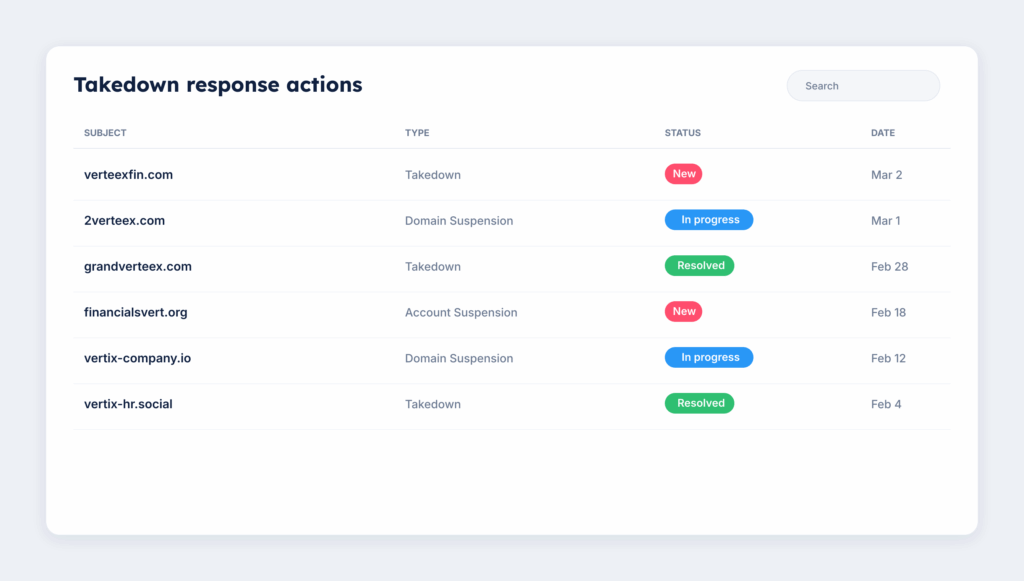
Styx helps your team act on findings through takedowns, evidence collection, track status, assign finding to dedicated teams, and general suggestions for mitigation.
- Styx Intelligence runs the takedown for lookalike and phishing domains, evil-twin sites, brand and executive impersonation, fake social profiles, exposed public documents and rogue apps. It builds the evidence pack, submits to the registrar, host, platform, or app store using the policy language each one requires, tracks the status, escalates if it stalls, and watches for the same actor registering a replacement.
- For leaked data on the dark web, which cannot be taken down at the source, Styx surfaces it quickly with context, so your team can reset passwords and revoke access before it is used.
A good place to start is to see what an attacker can already find about you. Book a demo and see the lookalike domains, fake profiles, and leaked data tied to your brand today.