

Today, many serious incidents begin with something simple: someone using a valid username and password (stolen credentials) that was exposed outside the company.
Where does that exposure happen?
In practice, it comes from a few different places, such as:
- Infostealer malware on an employee’s or contractor’s device
- Third-party breaches where customer or employee data is leaked
- Private leaks shared in dark-web forums, Telegram channels, and closed marketplaces
- Credential resale markets, where data brokers package and resell access to threat actors
Once credentials reach any of these channels, attackers can buy them, test them, and log into systems with legitimate access.
From Exploiting Systems to Abusing Access
Traditional cybersecurity focused on blocking intrusions inside the network.
Firewalls, antivirus, EDR, and SIEM, for example. However, all of that assumes an attacker is trying to break into your network/systems.
But over the last few years, the pattern shifted:
- Attackers don’t always need to “breach” a system
- They can often log in using credentials stolen somewhere else
- Those credentials may never have been created inside the environment they’re later used to attack
A few key shifts drove this:
- Heavy use of cloud and SaaS
- Employees reusing passwords across many services
- Widespread infostealer malware on personal and work devices
- A mature market for buying and selling credentials
The result is simple and uncomfortable:
A company can invest heavily in internal defences and still be exposed because a single employee or vendor reused a password on the wrong site months ago.
Where Stolen Credentials Actually Come From
When companies investigate incidents that start with “valid login,” they often realize the credential wasn’t hacked; it was exposed somewhere else first.
Most of these exposures fall into three buckets:
1. Public third-party breaches
When a vendor or partner is breached, their data often ends up published online. That data frequently includes:
- Employee corporate emails
- Reused passwords
- Personal identifiers (phone numbers, addresses) that make social engineering easier
Even if the breach happened outside your environment, it still creates risk because attackers reuse those attributes to build credibility.
2. Private leaks circulated in closed communities
Not all breaches become public. Some data is only shared in:
- Dark-web forums
- Telegram channels
- Invite-only marketplaces
These leaks tend to include more sensitive material, such as:
- Credentials for internal or third-party systems
- VPN usernames and passwords
- Files or screenshots taken from compromised machines
This data is actively traded and used quickly, which means companies often never see early warning signs unless they monitor these channels.
3. Infostealer malware (“stealer logs”)
This is the most damaging source of credential exposure.
If an employee’s device is infected with an infostealer:
- Every saved password in their browser is extracted
- The machine name and IP address are included
- Credentials for both corporate and personal accounts are uploaded to remote servers
- Attackers bundle these logs and resell them in bulk
Unlike phishing, which captures one credential, infostealers provide a complete snapshot of everything the employee uses.
And if a corporate username appears in a stealer log, it means one thing: That device was compromised.
How Stolen Credentials Move Through the Attacker Ecosystem
Once a username and password are exposed, they rarely stay in one place. It moves through a predictable chain that cybercriminals rely on.
You can think of it as a loose “supply chain”:
- Initial theft
- Infostealer malware infects machines
- Phishing pages capture logins
- Third-party services are breached
- Aggregation and packaging
- Credentials from many victims are bundled
- Logs are tagged by company domains, services, and geos
- “Premium” access (like VPN, email, admin tools) is separated out
- Resale or brokering
- Data brokers buy raw dumps and resell filtered access
- Access is advertised to ransomware groups or other threat actors
- Use for intrusion or fraud
- Attackers test and validate credentials
- Successful logins are used to move inside networks, exfiltrate data, or deploy ransomware
- They are used for direct fraud (payments, transfers, or account changes)
Each step takes time, and that delay is your window to detect and respond.
If your security team never looks at exposed credentials, stealer logs, or mentions on the dark web, you lose that window by default.
Why Many Teams Underestimate Credential Exposure
Most security teams acknowledge that credentials leak, but they still underestimate how critical those leaks are to all other cyber attacks.
Credential exposure almost always happens outside the organization’s visibility, and because it doesn’t trigger internal alerts, it doesn’t feel urgent.
Here’s why the risk gets downplayed inside many organizations.
1. Focus on internal alerts, not external exposure
Most cybersecurity workflows revolve around what happens inside the network:
- Endpoint Alerts
- VPN Logs
- Firewall Events
- Authentication Failures
But credential exposure doesn’t happen inside these systems at all.
Credential exposure from external sources (breaches, stealer logs, marketplaces) often sits outside the SOC’s field of view.
2. Overconfidence in MFA and SSO
MFA and SSO reduce risk, but they don’t eliminate it.
Reality:
- Many systems (especially VPNs, legacy apps, SaaS tools) don’t enforce MFA consistently
- If attackers obtain access to an email account or an exposed phone number, they can intercept some MFA flows
- Infostealer malware often captures not just passwords, but browser cookies and tokens, which can bypass MFA entirely
- Employees reuse passwords across systems, meaning an exposed password from a low-risk site can unlock access elsewhere
Relying on MFA as a catch-all defence causes teams to treat exposed credentials as “low urgency,” even though attackers actively exploit them
3. Underestimating third-party and consumer-facing accounts
Organizations typically prioritize internal credentials but overlook the significance of external accounts:
- E-Commerce Platforms
- Customer Portals
- Vendor Tools
- Cloud Storage Accounts
- Marketing Platforms
These accounts matter because:
- Employees frequently reuse passwords across internal and external platforms
- Attackers test stolen credentials on these systems first because they are easier to access and harder to monitor
- Files stored in external SaaS tools often contain sensitive data or tokens that allow escalation
- Compromised external accounts can be used to reset internal accounts, target customers, or impersonate the brand
Credential exposure isn’t isolated. Once a password is out there, it can be reused or chained into multiple attack paths.
4. Lack of clear ownership
Credential exposure crosses organizational boundaries, which creates operational friction.
It sits between:
- Security
- IT
- Legal
- Risk
- Compliance
- And sometimes even Marketing (in cases involving brand impersonation)
Because no team owns the entire lifecycle (detection, investigation, and remediation), exposed credentials often receive delayed attention. Detection happens late, and coordinated response happens even later.
The result: Attackers act before defenders even know there’s an issue.
What Companies Can Do to Detect Credential Exposures Early
Credential exposure is rarely loud or obvious. Passwords leak quietly, through third-party breaches, infected personal devices, shared marketplaces, or stealer malware, long before anyone realizes attackers have them.
Here’s what an effective detection model requires:
1. Build an accurate inventory of your external footprint
An asset inventory is more than a list of domains; it’s a map of everything attackers can see or use against you.
A complete inventory includes:
- Official domains and subdomains
- Cloud apps and public-facing services
- Third-party platforms connected to your business
- Forgotten or misconfigured hosts
- Exposed development environments
- Public buckets or storage locations
Why it matters:
- Vulnerable or outdated assets are often the entry point for impersonation infrastructure (fake login pages, brand misuse, redirect attacks).
- Third-party exposure is now as dangerous as first-party exposure; attackers use vendor portals and SaaS tools as stepping stones.
- Shadow IT creates blind spots that attackers exploit long before internal teams notice.
A clean inventory is the baseline for detecting anything that doesn’t belong.
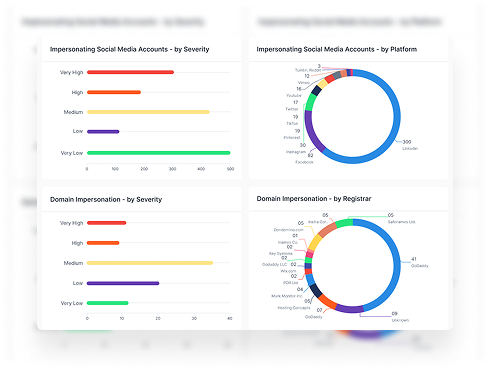
2. Monitor domains, social, dark web, and news in real time
Quick detection requires monitoring the places where attackers prepare and launch impersonation campaigns, not just where they end up.
Key data sources:
- Newly registered lookalike domains
- Fake profiles using your logo, colours, or messaging
- Dark web mentions, leaks, and listings
- Credentials in stealer logs or private dumps
- Suspicious sentiment spikes or false announcements
- Unauthorized use of brand assets in public pages
The value is not just “having data,” but getting notified quickly enough to act before it spreads.
3. Filter and score threats so your team knows what to handle first
Volume is the real challenge. External attack surfaces generate constant noise, most of it harmless.
Prioritization must be built around risk indicators based on context, not keywords.
What matters most:
- Domains that match your brand signature (logo, keywords, colours, layout)
- Clusters of domain registrations in a short time window
- Credentials confirmed to originate from infostealer malware
- Profiles that impersonate both your brand identity or people
- Pages that mimic login pages or support processes
- Mentions showing intent (selling data, planning attacks, targeting employees)
Remember, the critical part is speed.
Your team needs to know within minutes what is dangerous and what is noise.
4. Integrate takedowns directly into incident response
Integrating takedowns into incident response means:
- Fake domains are monitored or taken down as they appear
- Fraudulent sites are shut down before customers land on them
- Fake sites or impersonated profiles don’t accumulate credibility
- Attackers lose momentum instead of your team losing time
Treating takedowns as a core response step, not an optional service, dramatically reduces the exposure window.
5. Strengthen monitoring across third parties and public attack surfaces
Most impersonation attacks rely on external systems your team doesn’t own or control.
Critical areas:
- Third-party breaches exposing employee or customer credentials
- Compromised partner systems that attackers use to pivot
- Public-facing cloud storage or dev environments that leak internal content
- Open-source mentions or code snippets that reveal sensitive information
This is where early signals usually appear… long before an impersonation becomes visible to customers.
The sooner you recognize these early-stage indicators, the sooner you can stop the downstream attack.
Final thoughts
Always remember, modern attacks don’t always start with a technical break-in. They often start with a login used by someone in the company.
That login came from somewhere:
- A public breach at a service you use
- A private leak shared in underground spaces
- A stealer log from an infected employee device
If you want to reduce this risk, you need visibility into where your credentials show up outside your perimeter, and a plan to act before attackers use them.
Styx’s role in this space is simple: give your team that visibility across public breaches, private leaks, and stealer logs, so you can detect exposed credentials early and cut off access before it turns into an incident.