Dark Web and Credential Exposure
What Is Dark Web Monitoring? Benefits, Use Cases, and Tools
Styx Team · · 9 min read
Updated
Key Takeaways
- Build the watchlist: domains, company/brand terms, exec names, email patterns, code/secrets.
- Verify & prioritize: capture evidence, link to a breach/vendor, and score by ability to move money/credentials or harm reputation.
- Act & prevent: reset/MFA, launch takedowns, notify affected parties, fix root causes (secrets hygiene, vendor controls), and track recurrences.
- Summarize the article with
Summarize this article with:ChatGPTGeminiPerplexityClaudeGrok
Dark web monitoring shows you what’s happening behind closed doors — where stolen credentials, leaked files, and impersonations spread fast.
If you’re not watching, you’re reacting too late.
In this article, we break down what it is, why it matters, the main benefits, real-world scenarios, and how to pick a tool that gives you real answers, not just noise.
Let’s begin.
What Is the Dark Web?
The dark web is a part of the internet most people never see. You can’t find it on Search Engines. You can’t open it in a normal browser. You need special tools like Tor to get in.
Most of it is hidden on purpose. That includes forums, marketplaces, and chat groups used by criminals. This is where they post stolen data, sell login details, and talk about how to break into systems.
It’s not all illegal — but most of what matters to your business is. If your data is there, someone leaked it. Someone is selling it. Or someone is about to use it.
That’s why dark web monitoring matters. It helps you find out what’s already out there. Before someone uses it against you.
What Is Dark Web Monitoring?
Dark web monitoring is the process of tracking and detecting your company’s exposed data across underground forums, marketplaces, and paste sites. It works around the clock — scanning for leaked credentials, private documents, impersonation attempts, or any mention of your business.
This isn’t like identity theft protection for individuals. It’s built for security teams. Good monitoring shows you raw data and gives enough context so you can decide what’s real, what needs action, and what can wait.
It looks for:
- Email addresses or usernames tied to your organization
- Internal files posted on paste sites
- Mentions of your domains, tools, or infrastructure
- Criminal chatter about your business or vendors
It’s not just about finding leaks. It’s about knowing early — and acting before someone uses that data against you or your business.
How Dark Web Monitoring Works
Monitoring the dark web involves both technology and human expertise:
- Automated Crawling: Specialized bots scan known marketplaces, forums, and data dumps to identify stolen information.
- Targeted Alerts: Systems flag keywords or identifiers like email addresses, credit card numbers, or employee usernames when they surface online.
- Human Analysts: Experts investigate flagged content, validate whether it’s real, and assess the scope of exposure.
- Passive and Legal Observation: Dark web monitoring avoids illegal interactions — it strictly observes and reports, without participating in the market itself.
Good systems add context: when it was posted, how it was exposed, where it was found, and whether it links to a known breach or threat actor.
Dark Web Monitoring: What Can You Detect?
The dark web is where leaked data, stolen credentials, and cybercrime tools are shared, sold, and discussed. It’s also where attackers plan, coordinate, and brag about what they’ve already done — or what they’re about to do.
That makes it a key source of early warning signs.
Here’s what usually shows up:
- Leaked credentials: Employee usernames, passwords, tokens, and other access keys.
- Stolen data: Internal files, customer records, or product details exposed through breaches or malware.
- Phishing kits and malware: Tools used to attack you or your customers.
- Impersonation and brand abuse: Fake domains, cloned sites, or social accounts pretending to be your company or staff.
- Planned attacks: Threat actors discussing vulnerabilities, targeting your team, or buying access to your network.
- Vendor-related exposure: Your data showing up because a third party leaked it.
If you see these signs, it often means:
- You’ve had a breach — directly or through a partner
- Someone is impersonating your company or staff
- You’re already being targeted
This is what dark web monitoring helps you find — before the damage spreads.
The Business Impact of Data Leakage
When company data leaks, even if the leak happens through a vendor or employee, it doesn’t go unnoticed for long. Soon enough, that data finds its way into dark web forums, marketplaces, or encrypted chat groups. And from there, the damage spreads quickly.
Here’s what that fallout looks like:
- Credential-stuffing attacks: Attackers use stolen usernames and passwords to break into other systems, often at scale. If your team reuses passwords, the impact multiplies.
- Account takeovers: Access to email, file storage, and internal tools lets attackers move quietly inside your environment. These intrusions often go undetected until the damage is done.
- Phishing and social engineering: Leaked personal details give threat actors everything they need to craft convincing scams. The result? More successful phishing campaigns that hit both your team and your customers.
- Regulatory fines: Data exposure can trigger investigations and penalties under laws like GDPR, HIPAA, or CCPA. That’s not just a legal issue — it’s a financial one too.
- Loss of trust: Trust is hard to earn and easy to lose. A data leak tells your customers and partners that their information wasn’t safe with you.
- High cleanup costs: The aftermath includes everything from incident response and forensic investigations to legal counsel, crisis communication, and compensation offers.
But the damage doesn’t stop there. Once your data is out, it’s out for good. It becomes part of a growing ecosystem of shared intel among cybercriminals — making your brand a target, again and again.
That’s why fast detection and response are critical. The longer it sits exposed, the more doors it opens.
What To Do If You’re Affected
If your data is found on the dark web, don’t panic. Follow these steps:
- Identify the Scope: What’s leaked? Passwords, card numbers, IDs?
- Secure Affected Accounts: Change passwords, enable 2FA, and alert your bank or provider.
- Watch for Abuse: Monitor account activity, credit reports, and login attempts.
- Notify Others: If you manage a business, alert customers or partners whose data may be affected.
- Take It Down and Report it: Launch takedowns for spoofed domains, phishing pages, or impersonated accounts. Also, contact law enforcement or a cybercrime unit.
- Prevent Future Leaks: Harden your security posture — patch systems, train employees, and monitor continuously.
Once your data hits the dark web, you usually can’t remove it — but you can minimize the damage and prevent recurrence.
The goal is to identify exposure early, understand the risk, and take action before it becomes a bigger problem.
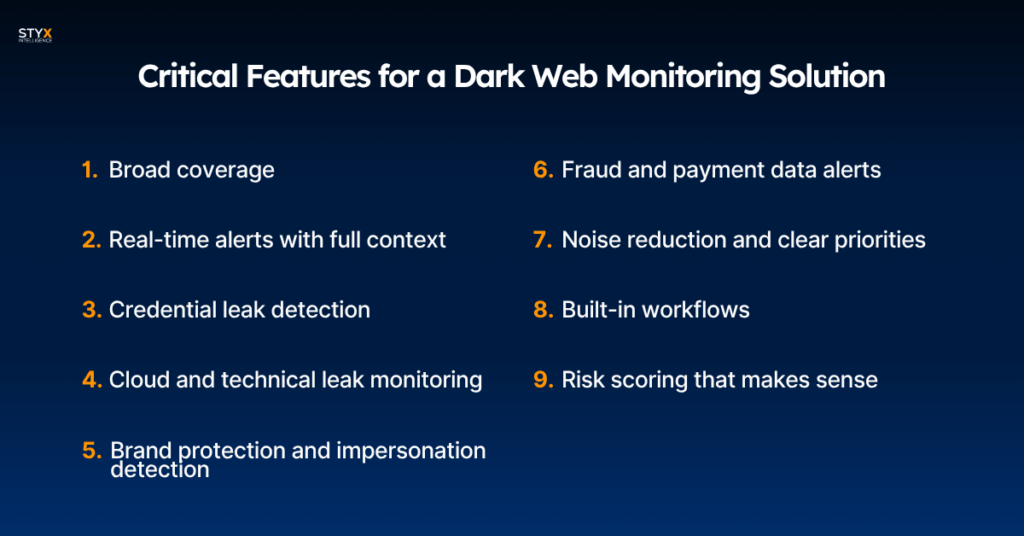
Critical Features for a Dark Web Monitoring Solution
If you’re evaluating dark web monitoring tools, look for more than just alerts. You need coverage, speed, context — and a platform that helps you act, not just watch.
Here’s what really matters:
1. Broad coverage
Monitor the surface, deep, and dark web — including forums, marketplaces, paste sites, and encrypted chat channels. You want visibility where threats actually start, not just where they end up.
2. Real-time alerts with full context
Get notified as soon as stolen data, credentials, or brand mentions show up — including what was found, when, and where. Alerts should include screenshots, metadata, and links so your team can assess and respond without wasting time.
3. Credential leak detection
Catch exposed logins tied to your employees, partners, or customers before attackers use them in phishing or account takeover.
4. Cloud and technical leak monitoring
Find leaked business files, source code, internal tools, VPN credentials, or cloud keys. These exposures are often overlooked but can lead directly to a breach if missed.
5. Brand protection and impersonation detection
Track abuse of your company name, domain typos, logos, or executive identities — whether they show up on a fake site or as part of a scam in criminal chats. Learn more: Doxing – What It Is and Why It’s Growing.
If you want to learn more about brand protection, here is everything you need to know.
6. Fraud and payment data alerts
Monitor for stolen credit card numbers, banking details, or payment platform abuse that could lead to fraud or fines. Useful not just for e-commerce — any brand can be impersonated in scams.
7. Noise reduction and clear priorities
See what really matters — with filters that remove outdated, duplicate, or irrelevant leaks. Your team shouldn’t waste time sorting signal from noise.
8. Built-in workflows
Review, track, and respond to findings without jumping between tools. Assign owners, update status, and launch takedown requests right from the platform.
Want to learn more about takedowns? Check out this article.
9. Risk scoring that makes sense
Know which threats to focus on — based on the type of data, where it was found, how recent it is, and how likely it is to be used against you. Prioritization should match business impact, not just volume.
Here are “the secrets” behind the risk scorecard.
These are the features that help you act fast, focus your team, and get ahead of problems — not just hear about them late. When the stakes are high, you need more than alerts. You need a system that drives action.
Dark web monitoring is one of the layers in the future of Digital Risk Protection (DRP)
Top Benefits of Dark Web Monitoring
Dark web monitoring gives security teams the visibility they need to act fast, reduce risk, and protect what matters most. It turns hidden threats into clear, actionable insights.
Here’s how it helps:
1. Early threat detection
Spot stolen credentials, brand abuse, and internal data leaks before they’re used against you — often before traditional tools catch them.
2. Faster response
Shut down access, notify impacted teams, and start remediation while there’s still time to limit the damage.
3. Stronger third-party oversight
Detect leaks linked to your vendors or service providers, even if they’re the ones at fault — and protect your business from the fallout.
4. Better compliance posture
Support GDPR, HIPAA, and other regulatory frameworks by monitoring for exposure of sensitive data — and documenting how you responded.
5. Improved threat intel
See what cybercriminals are discussing, targeting, or trading — and use that insight to guide detection rules, takedowns, and security decisions.
6. Lower incident costs
Fast detection shrinks the breach timeline. That means fewer legal headaches, smaller fines, and less customer churn.
7. Protects brand trust
When sensitive data leaks, customers look at you, not your vendors. Staying ahead shows them you’re serious about security.
8. Supports exec and board reporting
Use clear metrics, like leaked credentials caught or takedowns completed, to show progress and demonstrate value to leadership.
9. Helps prioritize security actions
Don’t just respond to alerts. Focus on threats that target your assets, your people, and your customers — the ones that actually matter.
Done right, dark web monitoring closes the gap between external risk and internal action. It helps your team see more, act faster, and stay in control.
Real-World Use Cases
These are some of the most common scenarios security teams deal with:
1. Employee credentials leaked in a forum
A routine scan detects a dump of work emails and passwords. Security resets affected accounts, rolls out MFA, and updates access controls across the board.
2. Vendor breach with access to internal systems
A mention of a trusted third party appears on a dark web marketplace. Investigation reveals exposed credentials. The team locks access, reviews the SLA, and escalates with the vendor.
3. Chatter about a potential ransomware campaign
Underground chatter points to a threat group discussing your industry. Intelligence helps the team patch high-risk systems, run tabletop exercises, and tighten endpoint defences.
4. Impersonation site targeting customers
A cloned login page is found through dark web monitoring. Security requests a takedown and notifies affected users, stopping phishing attacks before they spread.
Threat actors don’t wait for your next audit. They’re already trading stolen data, impersonating your brand, and planning their next move. If you’re not watching the dark web, you’re missing a key part of the picture.
Want to see what they see?
Book a demo and find out how Styx helps you detect leaks, impersonations, and other digital threats — before they impact your business and customer trust.
Phishing sites found, filed, and taken down by Styx
Talk to UsRelated articles
Shadow IT Data Leakage: How Unapproved Tools Expose Data
Why Is Shadow IT a Data Leakage Problem? Most teams do not find shadow IT through a planned audit. They find it after company data appears in a tool, account, or folder that security never approved. That might be a custo
May 29, 2026 · 11 min read
How Account Takeover Attacks Work
Account takeover (ATO) attacks often start with access that looks legitimate. An attacker uses a stolen password, a leaked session token, a phishing link, or a fake login page to get into a real account. Once inside, the
May 8, 2026 · 7 min read
What Is Credential Stuffing?
Credential stuffing is when attackers use stolen usernames and passwords to break into accounts. They do not guess passwords. They use login details that have already leaked from past breaches, then test them across webs
May 2, 2026 · 7 min read